Forum Discussion

Can't seem to find the answer to a simple solution?

Thanks. That clears it up, The result of the formula in G6:G25 is 0, so the formula in G26 returns the value of G25, i.e. 0. But you have set the sheet not to display a zero in cells that have zero value, so the cell looks blank.
Solution: change the formula in G2 to
=IF(E2="","",E2*0.8)
and fill down to G25. G6:G25 will now contain the text value "" instead of the number 0. G26 will then display the expected value:

Ok, that worked for Column "G"...but how do I then get rid of (not show) all the other "zeros" that are now in my spreadsheet? Can it be done in a simplified manner? I rather go back to the old way if I have to manually fix every single column.
Appreciate the help! Thanks
- Mike_SchellJul 20, 2022Copper Contributor
And the puzzle continues...
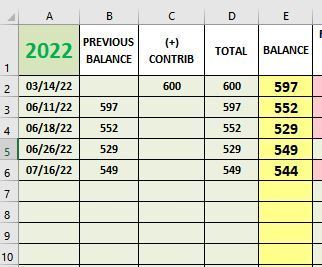
I entered =IF(SUM(B2:C2)=0,"",SUM(B2:C2)) in D2 and filled down just to D5 to start.
The fill color, font and size changed in D3-D5 but I know how to fix that. Also the values in F3-F5 didn't change and they are correct.
But...when I went back and filled down to D6 (as evident by the white box), the zero disappeared which is what I want ...BUT...I get an error in F6. Obviously, I would like all the zeros in column F to not show as well until I enter values for the line. Does the formula for column F need to change? Is it similar to the formula you gave me for column D?
I mean, Excel does so much! It amazes me that a simple thing like not showing zeros and still wanting to have a running total at the bottom would be less complicated.
- HansVogelaarJul 20, 2022MVP
No, that wouldn't work - a formula in D6 cannot refer to D6 itself.
In D2:
=IF(SUM(B2:C2)=0,"",SUM(B2:C2))
Fill down to D25.
- Mike_SchellJul 19, 2022Copper Contributor
Sorry, must not be doing something right. Can't seen to get it to work.
So, to get the zeros to "disappear" in column "D", starting with D6 in this case, the new formula in D6 should be
=IF(D6="","",SUM(B6:C6) ...and then fill down to D25? Also, for this column I do not need to see the running total at the bottom like before, which would be D26, I just don't want to see the zeros if I haven't entered any data for that line yet.
Thanks
- HansVogelaarJul 18, 2022MVP
Change the formulas the same way I did for G2:G25.