Forum Discussion

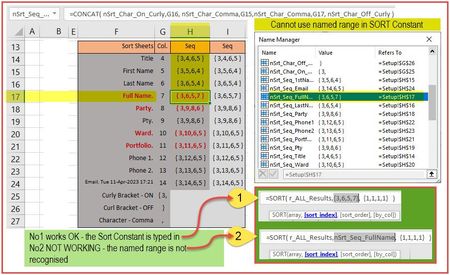
Cannot use Named Range in SORT Constant
 Apr 11, 2023
Patrick2788 Thanks again.
Jos Woolley hinted that I need to specify an array and not text that merely looks like an array with curly brackets. I went ahead and created array containing those numbers and IT WORKS!
Conclusion: You CAN use a named range in the sort constant - but the range must be an Array.
The pic below shows my success getting this working OK. Thanks for the swift attention.
Problem solved. Raphael
SORT constant using a Named Range

If Setup!H17, which is a single cell, holds {3,6,5,7}, then clearly {3,6,5,7} cannot here represent an array, but rather an array stored as text, for example as the result of
=ARRAYTOTEXT(A1:D1,1)
with A1:D1 containing the integers 3, 6, 5 and 7.
What's more, the sort_index parameter of SORT should comprise a single value, not an array.
Regards
Thanks for your prompt message Jos Woolley. You have convincingly indicated the problems with my samples but sadly have not indicated how to fix my problem.
I would appreciate you having another go at this one indicating what I may need to change to get this working. My objective, as was made clear already, is to somehow drive the SORT constant from the numbers I have generated already.
I'm sure I'm almost there. Syntax syntax!
Thanks for your help. Raphael
- Patrick2788Apr 11, 2023Silver ContributorThe workaround is to store the array constant directly in the named item.
- RaphaelBMApr 11, 2023Tin Contributor
Patrick2788 Thanks again.
Jos Woolley hinted that I need to specify an array and not text that merely looks like an array with curly brackets. I went ahead and created array containing those numbers and IT WORKS!
Conclusion: You CAN use a named range in the sort constant - but the range must be an Array.
The pic below shows my success getting this working OK. Thanks for the swift attention.
Problem solved. Raphael
SORT constant using a Named Range
