Forum Discussion

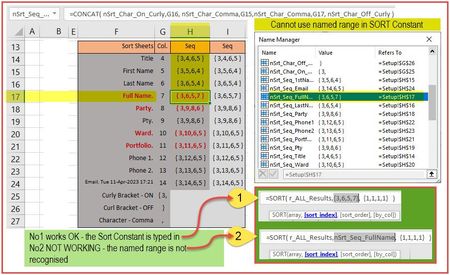
Cannot use Named Range in SORT Constant
 Apr 11, 2023
Patrick2788 Thanks again.
Jos Woolley hinted that I need to specify an array and not text that merely looks like an array with curly brackets. I went ahead and created array containing those numbers and IT WORKS!
Conclusion: You CAN use a named range in the sort constant - but the range must be an Array.
The pic below shows my success getting this working OK. Thanks for the swift attention.
Problem solved. Raphael
SORT constant using a Named Range

If Setup!H17, which is a single cell, holds {3,6,5,7}, then clearly {3,6,5,7} cannot here represent an array, but rather an array stored as text, for example as the result of
=ARRAYTOTEXT(A1:D1,1)
with A1:D1 containing the integers 3, 6, 5 and 7.
What's more, the sort_index parameter of SORT should comprise a single value, not an array.
Regards
- RaphaelBMApr 11, 2023Tin Contributor
Thanks for your prompt message Jos Woolley. You have convincingly indicated the problems with my samples but sadly have not indicated how to fix my problem.
I would appreciate you having another go at this one indicating what I may need to change to get this working. My objective, as was made clear already, is to somehow drive the SORT constant from the numbers I have generated already.
I'm sure I'm almost there. Syntax syntax!
Thanks for your help. Raphael
- Patrick2788Apr 11, 2023Silver ContributorThe workaround is to store the array constant directly in the named item.
- RaphaelBMApr 11, 2023Tin Contributor
Patrick2788 Thanks again.
Jos Woolley hinted that I need to specify an array and not text that merely looks like an array with curly brackets. I went ahead and created array containing those numbers and IT WORKS!
Conclusion: You CAN use a named range in the sort constant - but the range must be an Array.
The pic below shows my success getting this working OK. Thanks for the swift attention.
Problem solved. Raphael
SORT constant using a Named Range
