Forum Discussion

Cannot enter dates in English (Australia) format
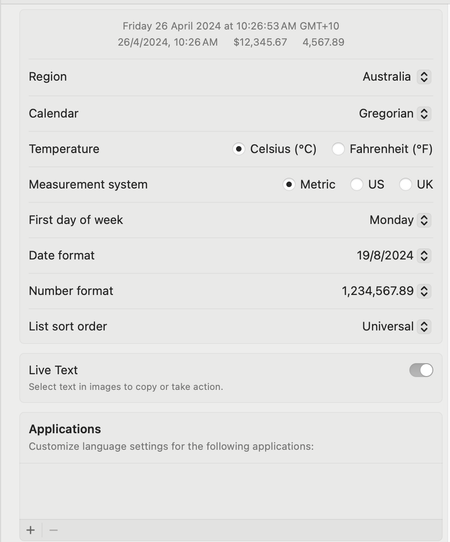

It seems like your Excel is defaulting to the USA date format even though your language and region settings are configured for Australia. Here are a few steps you can try to resolve this issue:
- Check Excel's Language Preferences: Ensure that Excel's language preferences are also set to English (Australia). You can usually find this setting under Excel Preferences > General > Language.
- Change System Date Format: Sometimes, Excel takes the date format from the system settings. Make sure your Mac's system date format is also set to English (Australia). You can adjust this in your Mac's System Preferences > Language & Region > Advanced > Dates.
- Check Date Format Cells: Ensure that the cells where you are entering dates are formatted correctly. You can do this by selecting the cells, right-clicking, choosing Format Cells, and then selecting the appropriate date format under the Number tab.
- Use Text-to-Columns Feature: As a workaround, you can use the Text-to-Columns feature to parse dates. Select the column with dates, go to Data > Text to Columns, choose Delimited, and then select the appropriate date format. This may help Excel recognize the dates correctly.
- Repair Office Installation: If none of the above steps work, try repairing your Office installation. Sometimes, corrupted installation files can cause unexpected behavior.
The text and steps were edited with the help of AI.
My answers are voluntary and without guarantee!
Hope this will help you.
Was the answer useful? Mark as best response and Like it!
This will help all forum participants.
 letslightafireApr 25, 2024Copper ContributorHi,
thanks for your response!
I cannot find Excel's language preferences in the Mac version. Maybe you're thinking of the Windows version?
Steps 2 and 3 I have already done.
Step 4 is a possible workaround if I type all my dates using the general format. I may give this a go - extra time unnecessarily but if no other options will try it..
Anyone else in the forum have other ideas?- NikolinoDEApr 25, 2024Platinum Contributor
Apologies for the confusion. You're correct that the language preferences in Excel are more prominent in the Windows version. In the Mac version, Excel typically takes its language and regional settings from the system preferences.
Since you've already checked and adjusted your Mac's system date format and formatted the cells correctly, and you're considering using the Text-to-Columns feature as a workaround, let's explore another potential solution:
You can try creating a custom date format that mimics the Australian date format explicitly. Here's how you can do it:
- Select the cells containing dates.
- Right-click and choose "Format Cells..."
- In the Format Cells dialog box, go to the "Number" tab.
- Select "Custom" from the list on the left.
- In the "Type" field, enter the custom date format: dd/mm/yyyy
- Click OK to apply the custom format.
This custom format explicitly tells Excel to display dates in the format Day/Month/Year, which should match the Australian date format.
 AHQPtyLtdMay 22, 2024Copper Contributor
I do not know if my opinion relates to your post: BUT... the Australian user "Date" experience on the basis of 30 people in the Upper Murray district shows that the Australian Date Format problem has hit EVERYONE!
I do not know why Microsoft staff think that the user can fix it. It is a system-wide problem.
Jack up! Tell your respondent to report this issue to Microsoft's system controllers.
This will be news within the next few weeks.