Forum Discussion

jlockley
May 20, 2026Copper Contributor
Cannot change some cells to date format in Excel
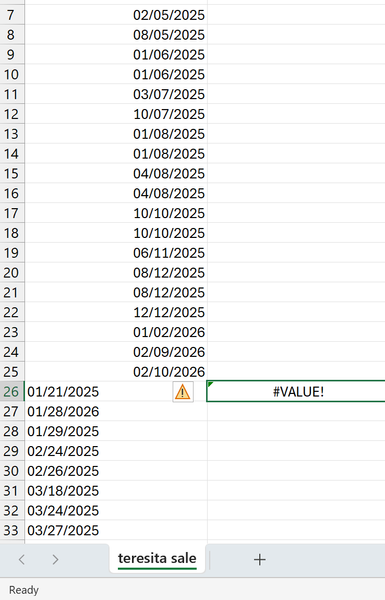
A downloaded Bank statement refuses to allow some but not all cells to be converted to date formats. I have tried simply to format them as dates converted text to columns using both fixed width ...
 May 21, 2026
Hi jlockley,
There is a high possibility that your computer's date system is in the dd/mm/yyyy format and if so, Excel does not recognize data in the mm/dd/yyyy format as dates. In this case, you can use this formula to extract dates in the dd/mm/yyyy format.
=LET(date, A26:A33, DATE(RIGHT(date, 4), LEFT(date, 2), MID(date, 4, 2)))HTH
IlirU

SergeiBaklan
May 22, 2026Diamond Contributor
Data -> Text to Columns ->Fixed width -> Next -> Next -> select Date as MDY -> Finish
Above shall work. Critical part is selecting of MDY (source format)

jlockley
May 22, 2026Copper Contributor
It only works with delimited option with "none" (check box) as chosen delimiter. Otherwise useless.
The trick is to set delimiter as "none"