Forum Discussion

jlockley
May 20, 2026Copper Contributor
Cannot change some cells to date format in Excel
A downloaded Bank statement refuses to allow some but not all cells to be converted to date formats. I have tried simply to format them as dates converted text to columns using both fixed width ...
 May 21, 2026
Hi jlockley,
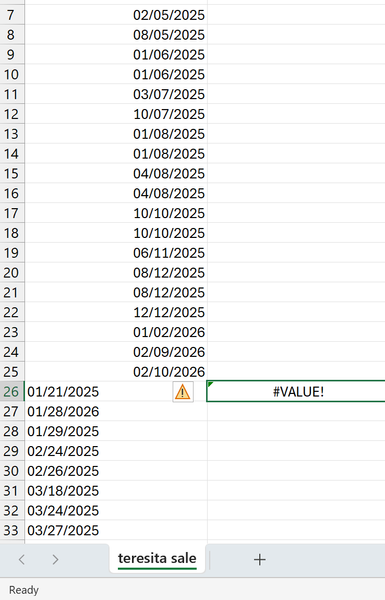
There is a high possibility that your computer's date system is in the dd/mm/yyyy format and if so, Excel does not recognize data in the mm/dd/yyyy format as dates. In this case, you can use this formula to extract dates in the dd/mm/yyyy format.
=LET(date, A26:A33, DATE(RIGHT(date, 4), LEFT(date, 2), MID(date, 4, 2)))HTH
IlirU
IlirU
May 22, 2026Iron Contributor
Hi jlockley,
Assuming that your computer has the date in the format dd/mm/yyyy and if some dates are in the correct format, i.e. dd/mm/yyyy and some others are given in the format mm/dd/yyyy then you can use the following formula to have all dates in the format dd/mm/yyyy.
=--REGEXREPLACE(A7:A33, "^(\d{2})/(\d{2})/(\d{4})$", "\2/\1/\3")Select all the data that comes out of the formula and go to Format Cells (use CTRL + 1 from the keyboard) and under Category select Date and then OK.
The formula is for Excel 365 or Excel for the web.
IlirU