Forum Discussion

cannot change date format
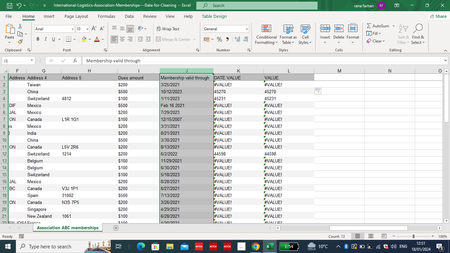

As variant
- select column J
- on ribbon Data->Text to Columns
- on the third step of the wizard select Date and MDY
Finish

I also tried this. the months are not in consistent format, some have names others are numbers. then I have to apply again many functions.
I don't understand what the problem is with the data. can you please provide a simple solution, so that, next time I encounter this type of data, I won't need to do this lengthy work?
- SergeiBaklanJan 18, 2024Diamond Contributor
It depends on from which source you receive your data and on which platform/version of Excel you are.
If the source is csv file and you are on 365, instead of opening csv in Excel and save it to xlsx, you may insert csv into blank excel file using Legacy from text wizard, on older versions it works by default
When wizard works set proper setting for the column with dates.