Forum Discussion

Can pivot value field be auto-updated?
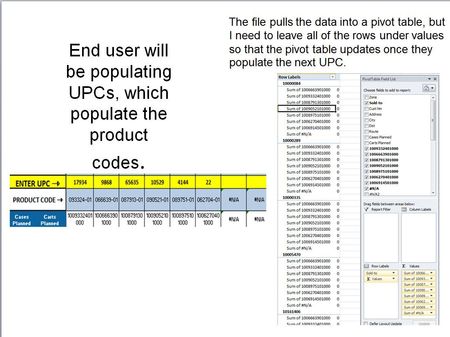

When the end user adds a new UPC, the #N/A in the values field goes away and the resulting product code appears in the top of the fields list waiting to be added. I'd like the newly added value to automatically be added to the values field in place of the #N/A.
I'll definitely also check out Power Pivot - looks pretty useful.

If you have Excel 2016 and can send me a small mocked up data set I could pull together a quick illustration for you
- Scott_P_WApr 28, 2019Copper ContributorUnfortunately, I dont have 2016.
- Wyn HopkinsApr 29, 2019MVPWhat version do you have?
- Scott_P_WApr 29, 2019Copper Contributor
2010 :(
I've attached a test file that I am using. Basically, the end user will choose a UPC on the dropdowns in row 4 on the first tab and then copy the values to the data worksheet.
You'll see that I have some of the unpopulated dropdowns in the values field showing #N/A. When the next dropdown in used, the error disappears and the new product code shows up at the top. I'd like it to go straight to the Values field list. A bonus would be if it would also change the description and get rid of "sum of"
Hope this helps :) Thank you!