Forum Discussion

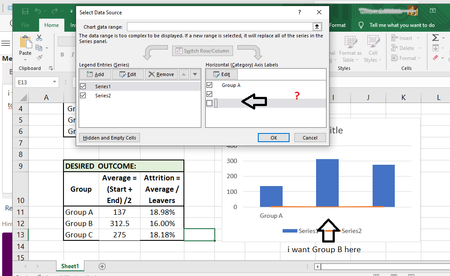
Can´t edit the label in column grafic
- Dec 27, 2022
The easiest solution is to click in the 'Chart data range' box and then to select B10:D13.
As you see, this assigns meaningful names to the chart series and fixes the x-values.
After that, you should select the Attrition series and plot it on the secondary axis:
Result:
See the attached workbook.

Could you attach a small sample workbook demonstrating the problem (without sensitive data), or if that is not possible, make it available through OneDrive, Google Drive, Dropbox or similar?

https://www.dropbox.com/scl/fi/5ufyd0j6n92kadpn6s7ke/GraficDataExample.xlsx?dl=0&rlkey=1bchowcwo1o2rnhfx984149as
- HansVogelaarDec 27, 2022MVP
The easiest solution is to click in the 'Chart data range' box and then to select B10:D13.
As you see, this assigns meaningful names to the chart series and fixes the x-values.
After that, you should select the Attrition series and plot it on the secondary axis:
Result:
See the attached workbook.
- alfonsoDevDec 28, 2022Copper Contributorthanks a lot, I thought to solve it differently