Forum Discussion

Can´t edit the label in column grafic
- Dec 27, 2022
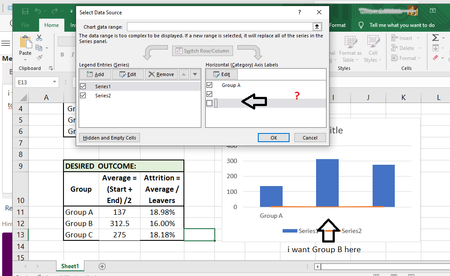
The easiest solution is to click in the 'Chart data range' box and then to select B10:D13.
As you see, this assigns meaningful names to the chart series and fixes the x-values.
After that, you should select the Attrition series and plot it on the secondary axis:
Result:
See the attached workbook.


As recommended to you by Mr Vogelaar, a file (without sensitive data) and information about the storage medium, Excel version and operating system would help a lot.
Nevertheless, I am sending you this link:
Edit titles or data labels in a chart
What do you want to do?
Edit the contents of a title or data label on the chart
Edit the contents of a title or data label that is linked to data on the worksheet
Reestablish the link between a title or data label and a worksheet cell
Change the position of data label
...which might be of some help to you.
If not...follow Mr. Vogelaar's instructions :).
I wish you a happy new year and lots of success with Excel.