Forum Discussion

Calorie Amortization Excel Template Issue
- Mar 07, 2018
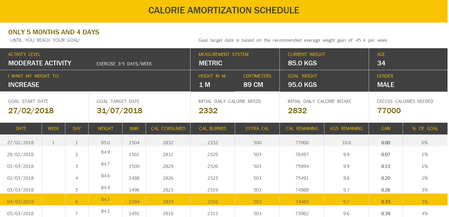
I found the culprit formula which is in E12
formula in E12 is =IFERROR(IF($D12<>"",E11-(I11/CalsPerPound),""),"") which reduces the extra calories regardless if the cell I10 is CAL Decrease or EXTRA CAL
the formula in E12 down the column should be dynamic to check the value in Cell I10 and if it is CAL DECREASE it should reduce andif it is EXTRA CAL then it should increase
so put this formula in cell E12 and copy down.
or simply find attached workbook.
=IFERROR(IF($D12<>"",IF($I$10="CAL DEFICIT",E11-(I11/CalsPerPound),IF($I$10="EXTRA CAL",E11+(I11/CalsPerPound))),""),"")
it should work by then.


I uploaded the file with the template. I hope this is what you meant.
- JamilMar 07, 2018Bronze Contributor
I found the culprit formula which is in E12
formula in E12 is =IFERROR(IF($D12<>"",E11-(I11/CalsPerPound),""),"") which reduces the extra calories regardless if the cell I10 is CAL Decrease or EXTRA CAL
the formula in E12 down the column should be dynamic to check the value in Cell I10 and if it is CAL DECREASE it should reduce andif it is EXTRA CAL then it should increase
so put this formula in cell E12 and copy down.
or simply find attached workbook.
=IFERROR(IF($D12<>"",IF($I$10="CAL DEFICIT",E11-(I11/CalsPerPound),IF($I$10="EXTRA CAL",E11+(I11/CalsPerPound))),""),"")
it should work by then.