Forum Discussion

Tegzi
Jun 13, 2023Copper Contributor
Calculation within official excel table (structured data)
Hello. I struggle to find the right function to do this calculation. Let's say we have an official excel table - Table1 - that has 2 columns. The first column - with header "Value" - contains ra...
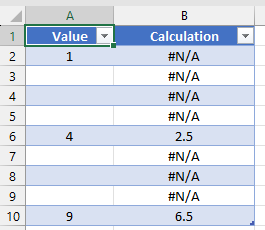
- Jun 14, 2023
Hi Tegzi
Given you run 365. Does the following do it?:
Edited:
=LET(
  idx, INDEX([Value], SEQUENCE(ROW()-ROW(Table1[#Headers]))),
  flt, FILTER(idx, idx > 0),
  IFS(ISBLANK([@Value]),"", ROWS(flt)=1,[@Value], TRUE,AVERAGE(TAKE(flt,-2)))
)

Tegzi
Jun 14, 2023Copper Contributor
@ NikolinoDE
unfortunately the same result. I use Win11, Office 365 version.
I get the same #NUM! error in all cells. I get the same error back with this =AVERAGE(LARGE([Value],ROW([Value])-ROW([@Value])+{0,1})). Result is #NUM! in each cell.
unfortunately the same result. I use Win11, Office 365 version.
I get the same #NUM! error in all cells. I get the same error back with this =AVERAGE(LARGE([Value],ROW([Value])-ROW([@Value])+{0,1})). Result is #NUM! in each cell.

Lorenzo
Jun 14, 2023Silver Contributor
Hi Tegzi
Given you run 365. Does the following do it?:
Edited:
=LET(
  idx, INDEX([Value], SEQUENCE(ROW()-ROW(Table1[#Headers]))),
  flt, FILTER(idx, idx > 0),
  IFS(ISBLANK([@Value]),"", ROWS(flt)=1,[@Value], TRUE,AVERAGE(TAKE(flt,-2)))
)- TegziJun 14, 2023Copper ContributorLorenzo
Thanks, this works. I will need to analyze this to understand the full function, but it works 🙂
Much appreciate it.- LorenzoJun 14, 2023Silver Contributor
Glad this does what you expect & Thanks for providing feedback. A 365 alternative:
=LET( pos, TOCOL(TAKE(IF([Value],[Value],NA()),ROW()-ROW(Table1[#Headers])),2), IFS(ISBLANK([@Value]),"", ROWS(pos)=1,[@Value], TRUE,AVERAGE(TAKE(pos,-2))) )- TegziJun 14, 2023Copper Contributor@ L z.
Brilliant...that works too. Appreciate it.