Forum Discussion

Calculation within official excel table (structured data)
- Jun 14, 2023
Hi Tegzi
Given you run 365. Does the following do it?:
Edited:
=LET(
  idx, INDEX([Value], SEQUENCE(ROW()-ROW(Table1[#Headers]))),
  flt, FILTER(idx, idx > 0),
  IFS(ISBLANK([@Value]),"", ROWS(flt)=1,[@Value], TRUE,AVERAGE(TAKE(flt,-2)))
)


Thanks for this, but it won't work. I tried this both with a non-structured data (non official excel table) as well as with structured data (official excel table, where your formula looks like this based on my previously defined table structure: =AVERAGE(LARGE([Value],ROW([Value])-ROW([@Value])+{0,1})).
Value is the header of column A (A1), i.e. the name of the column. This returns back the error #NUM!
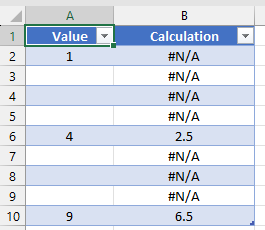
In the example I have values in column A2 (1), A6 (4) and A10 (9), the rest of the cells are empty.
So, with the right formula, I should read B6 = 4 (the average of 1 & 4), B10 = 6.5 (the average of 4 & 9).
Thanks for the initiative though.

The "Value" is the header of column A (A1), you can modify the formula as follows:
=AVERAGE(LARGE(Table1[Value],ROW(Table1[Value])-ROW([@Value])+{0,1}))
This modified formula references the structured table name "Table1" and the column header "Value" to retrieve the values for the calculation.
Make sure to enter this formula in the appropriate cell of the "Calculation" column within your official Excel table.
If you are still experiencing issues or encountering errors, please provide more details about your table structure and any specific error messages you are receiving.
Please provide some additional information too: Excel version, operating system (win, mac, etc.), storage medium (Sharepoint, OneDrive, hard disk, etc.).
- TegziJun 14, 2023Copper Contributor@ NikolinoDE
unfortunately the same result. I use Win11, Office 365 version.
I get the same #NUM! error in all cells. I get the same error back with this =AVERAGE(LARGE([Value],ROW([Value])-ROW([@Value])+{0,1})). Result is #NUM! in each cell.- NikolinoDEJun 14, 2023Platinum ContributorIs it possible to add a file (without sensitive data)?
- TegziJun 14, 2023Copper Contributor
Sure, this is a simple file. Obviously I'd like to use the formula for a bigger calculation to create charts. As soon as we figure out a workable formula for this, I'll be able to move forward with my plan.
Thanks,
TCS