Forum Discussion

Calculating multiple dates in excel
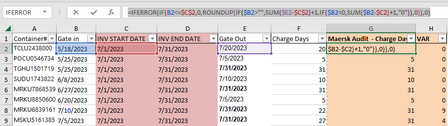

Lenni099 I tried replicating your situation in a sheet of my own and couldn't figure out how your formula would even work as it makes no sense at all.
The only way I could get to your results was to put text (any text, that is) in column B and that makes me believe that the 'dates' shown in column B are in fact texts that merely look like dates. That's why the formula doesn't pick-up the fact that the IN 'date' is after July 1. The result will always come from SUM($E3-$C$2)+1
Try this instead in E2 and copy down.
=IF(B2="","-",E2-MAX(B2:C2)+1)
 Lenni099Aug 18, 2023Copper Contributor
Thank you for your response and feedback. The formula I originally inserted originally came from an excel macro that we use that does work but in a slightly different situation.
I tried both formulas you provided and they do work , however, even though I changed the dates in Column B to text, any dates in July in Column B, are still not matching with the number I get in Column G vs what the vendor has listed :
 SnowMan55Aug 19, 2023Bronze Contributor
Lenni099 Riny is absolutely right that your data in columns B through E should be dates, not text. His formula is partially correct, but what I see is that (Correct) Charge Days is the number of days encompassed by these two dates, inclusive:
- the later of Gate in and INV START DATE
- the earlier of INV END DATE and Gate Out
Therefore, the formula for row 3 should be something similar to:
=MIN($D2,$E2) - MAX($B2,$C2) + 1In the future, please attach a small spreadsheet file (enough to demonstrate the issue at hand; be sure to remove any sensitive data) rather than making us redo the data entry.
- Riny_van_EekelenAug 18, 2023Platinum Contributor
Lenni099 You wrote "even though I changed the dates in Column B to text". You should NOT do that, because that's why it doesn't work. Sorry if I was unclear.
Make sure that the dates are real dates. Otherwise you can not do any calculations with them.