Forum Discussion

Calculating hours
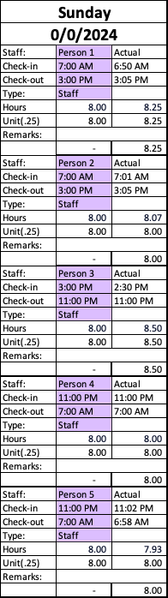

I am trying to attach the document but it does not allow .xlsx format. I will try and link it but I'm also having trouble with that.
- Is this layout one that you use for each of your clients, with some of them requiring only 1:1 services; others (like this example) requiring 2:1?
Only a few clients are 2:1. Not all.
2. Do you have a separate tab for each client?
There is a separate tab for each client.
3. Do some clients require an occasional 3:1 service (or any other variation)?
We do not have any 3:1 clients as of now.
4. Are the three shifts shown constant for all clients?
Some have up to 6 shifts. It could be anywhere from 1 shift to 6 shifts for 1 client.
5. Do some clients require services for only one or two shifts?
No
6. Finally, would you be willing to consider a different layout?
Yes

I am trying to attach the document but it does not allow .xlsx format.
It absolutely allows xlsx files to be attached. Down here, below the text box where you write your inquiry. You do need to click on "Open full text editor" to see it, but rest assured that xlsx files ARE allowed on the Excel tech community board!
And if you still can't, then go and put the file on OneDrive or GoogleDrive and paste a link here that grants access.
Thanks for the answers to the other questions, but it will be essential to see the file.
And while you're at that, since there are sometimes up to six shifts, it would be very helpful if you could include, either in that posted spreadsheet or in a text description, a complete description of how the shifts break down in terms of hours. The three shifts appear to be very consistent in terms of their start and stop times; are they? And hopefully the six shifts would be similarly consistent.
- cywestbrookSep 10, 2024Copper Contributor
It is attached! I was trying to drag it and it just wasn't working. Thanks.
Please use week 8/25 and 9/1. The past weeks are not updated with formula changes.
Jordan Bushman is an example of a 2:1 client.
- mathetesSep 10, 2024Gold Contributor
I'm having a hard time making sense of what I'm seeing in the case of Jordan Bushman. For one thing, I don't actually see any 2:1 staffing instances in the two weeks you mention. Am I missing something obvious? What is it? Or did you mean Jordan Boone? I do see some 2:1 shifts there.
Please then, tell me exactly what it is you want Excel to do for you?
If it's just a matter of "Do the check-in and check-out times in purple for any two consecutive "boxes" equal one another? If so, count as 2:1. Or do you want exact hours of 2:1 time as recorded under "Brittco," whatever that means, or under the purple (scheduled shift?)?
And what is Brittco?
But the more I think about this, the more I want "to get behind" this very elaborate system you have. (By "elaborate system" I mean such things as having one tab per client, separate sections for each day of the week, separate rows for each week, side by side data in each day for scheduled hours and actual hours).... this layout has all the markings of having been the way you (or your organization) tracked things when it was all done on large sheets of paper, so that what's happened is that you've taken a visual layout that, yes, made sense on paper, but fails to take advantage of Excel's abilities to handle transactional data, to sift and sort, categorize and summarize from a single table, a single table that contains all the data you have in those separate boxes on separate pages. What this looks like, in its current manifestation, is a system in which you (or your colleagues) do manually a LOT of work that Excel could be doing; you're asking for Excel to do the final step when it could be doing a lot of the heavier lifting.
So, I'd like to know what the source is for all these entries on all the separate tabs and their separate boxes. Are you getting a report from a system that reports on check-in and check-out times? Are there other sources of "raw data"? How does that data get into these tabs and boxes? How much of that is done tab by tab, cell by cell, where you or somebody else enters the staff names and their check-in and check-out times, the scheduled times, etc., etc.
Said another way, is there a source (are there several sources) of "raw data" preceding what you've shared here? If so, can we have a look at that "raw data"? If not, please describe how these little pieces of information get into this big workbook with all its client tabs and daily hours.
- cywestbrookSep 11, 2024Copper Contributor
Correction: I meant Jordan Boone not Bushman
About the spreadsheet…
This spreadsheet is shared between our scheduler who inputs the information in the purple filled boxes and myself who inputs the BRITTCO information. This schedule is also sent to staff.
This spreadsheet allows me to compare scheduled times with actual check in and check out times. I pull the report from BRITTCO.
BRITTCO is a software that our employees use to check in and out. It has a scheduler, but is not user friendly and more complicated than it is useful. So we stick to this spreadsheet because it works. BRITTCO is just not a perfect system and we just end up having to double check everything anyway.
Because it is a manual schedule all info is manually inputted.
Lets use Jordan Boone as an example.
On Sunday 8/25/24
Sydney was scheduled for 3pm-11pm. Actual was 2:51pm-11:12pm
Theresa was also scheduled for 3pm-11pm. Actual was 3pm-11pm
This is a 2:1 time slot. I need excel to compute both 2:1 and 1:1 then add them together to get the total for that day. Later total for that week needs to be computed. All answers showed separately.
For this example, 2:1 equals 8 hours
1:1 equals 21 mins or .35 hours (decimal preferred) because Sydney checked in 9 min before Theresa and checked out 12 mins after Theresa checked out. However, they spent 8 hours together. That’s why 2:1 equals 8 hours.
1:1(.35) + 2:1(8) = 8.35