Forum Discussion

Calculating Employee Work Hours, Minus Lunch/Break Time
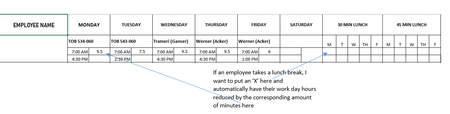

Hey! Great layout, this is very doable without restructuring your sheet.
Your current formula =(ABS(B3-B4)*24) correctly calculates raw hours. You just need to extend it to check whether an "X" exists in the 30-min or 45-min lunch columns and deduct accordingly.
Here's the updated formula:
=(ABS(B3-B4)*24) - IF(M3="X",0.5,0) - IF(R3="X",0.75,0)
Breaking it down:
- ABS(B3-B4)*24 → your existing hours calculation (keep this as-is)
- IF(M3="X",0.5,0) → if Monday has an X in the 30-min lunch column, deduct 0.5 hours
- IF(R3="X",0.75,0) → if Monday has an X in the 45-min lunch column, deduct 0.75 hours
Adjust column references per day:
| Day | 30 Min Lunch Col | 45 Min Lunch Col |
|---|---|---|
| Monday | M | R |
| Tuesday | N | S |
| Wednesday | O | T |
| Thursday | P | U |
| Friday | Q | V |
(adjust these to match your actual sheet columns)
To prevent both boxes being marked at the same time, use this safer version:
=(ABS(B3-B4)*24) - IF(M3="X", 0.5, IF(R3="X", 0.75, 0))
This checks 30-min first — if not marked, then checks 45-min. Only one deduction ever applies.
For your weekly total row, SUM all daily result cells:
=SUM(C3, E3, G3, I3, K3)
(replace with your actual daily result cells)
Important: Make sure your start/end time cells are formatted as Time in Excel (not text). If you see wrong results, select the time cells → Format Cells → Time → re-enter the times.
If you ever want to quickly verify whether your formula result is correct, I've seen people use https://mauricettecalcul.fr alongside their Excel sheet, you enter start time, end time and break minutes and it instantly confirms the number. Handy for spot-checking your formulas.