Forum Discussion

Calculated fields in pivot tables - field settings is grayed out.
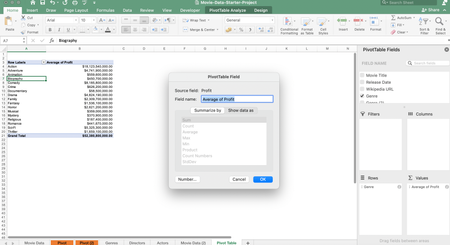

eyadnt83 Doesn't work. Sorry.

I uploaded to wetransfer, I think it will work now:
https://we.tl/t-JLzpxg3K2V
- Riny_van_EekelenApr 09, 2022Platinum Contributor
eyadnt83 Just forget about the calculated field "Profit" as you can indeed not change the "summarise by" setting. In stead, add a Profit column to the source data and drag that one into the value field. Now you can average the profit as desired. I see no other way. If you had been on Excel for Windows, you would have had more options to calculate the average without having to add a column to the source data.
- eyadnt83Apr 10, 2022Copper Contributor
Thanks for the feedback.
Actually i know thaT I can solve it with a helper column added to the source data such as (Profit Column).
But my point, why I cannot change the summarize by settings in my calculated sheets? what is the problem here? Why all the fields are grayed out while they should be activated by default.- Riny_van_EekelenApr 10, 2022Platinum Contributor
eyadnt83 It just doesn't work like that. Can't really explain why. Perhaps someone else can.