Forum Discussion

xgp_62
Feb 14, 2024Copper Contributor
Calculate days between dates excluding repeteated days
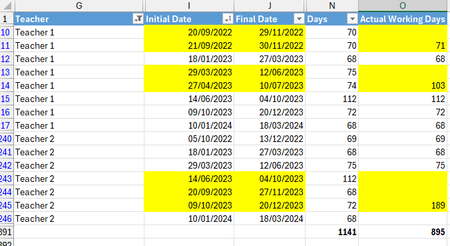
Hi, I have the following table with 3 columns: teacher, Initial & final date. Column "Days" calculates difference in days for each row, but as some days are repeated with date ranges (highlighted),...

OliverScheurich
Feb 15, 2024Gold Contributor
=IF(AND(G2=G1,I2<=J1),K1,K1+1)
With all versions of Excel you can enter this formula in cell K2 and fill it down to create a helper column.
=IF(K2<>K3,MAX(FILTER($I$2:$J$18,$K$2:$K$18=K2))-MIN(FILTER($I$2:$J$18,$K$2:$K$18=K2)),"")
This formula is entered in cell L2 and filled down to calculate the days. However the formula only works if you have access to the FILTER function.
=SCAN(0,SEQUENCE(ROWS(I2:J18)),LAMBDA(ini,arr,IF(AND(INDEX(I2:I18,arr)<=INDEX(J2:J18,arr-1),INDEX(G2:G18,arr)=INDEX(G2:G18,arr-1)),ini,ini+1)))
If you work with Office 365 or Excel for the web you can apply this formula to create the helper column.