Forum Discussion

Robert_Wasiuk
Feb 20, 2023Copper Contributor
Break Links isn't working, and I can't find my link even after downloading the "Find Links" add-in
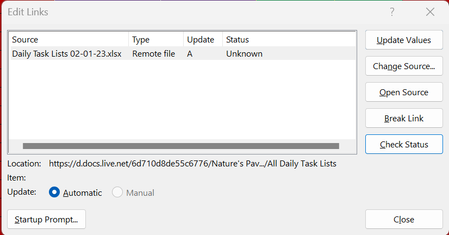
Apparently there's a link in my workbook. When I select it and click "Break Link", I get this: When I hit "Break Links", this dialouge box disappears and nothing happens. I downloa...
- Feb 21, 2023
You had a few sheet level named items that referred to the workbook itself. Most likely created when copying sheets. Notice in the capture how the C drive location points to my computer because the file itself is open on my C drive.
Link free workbook is attached.

Robert_Wasiuk
Feb 21, 2023Copper Contributor
This is it: https://1drv.ms/x/s!AnZnXOWNDXFtgcQrjv_VbSUYzdnc6w?e=aBZChM

Patrick2788
Feb 21, 2023Silver Contributor
You had a few sheet level named items that referred to the workbook itself. Most likely created when copying sheets. Notice in the capture how the C drive location points to my computer because the file itself is open on my C drive.
Link free workbook is attached.
- Robert_WasiukFeb 21, 2023Copper ContributorThanks so much for finding those! Did you delete them? Will it mess anything up?
- Patrick2788Feb 21, 2023Silver ContributorI deleted them. They're dupes of named items you already have as workbook level named items.
- Robert_WasiukFeb 21, 2023Copper ContributorAlso, how can I find and delete those in the future?
 peiyezhuFeb 21, 2023Bronze Contributor