Forum Discussion

sanggu_
Jul 02, 2025Copper Contributor
Blank Cells Item
Hi, Can someone share their best practice for this type of scenario. I'm new in data cleaning, any help is appreciated. What I wanted to do is to fill the blanks in "Item" column using the "Categor...
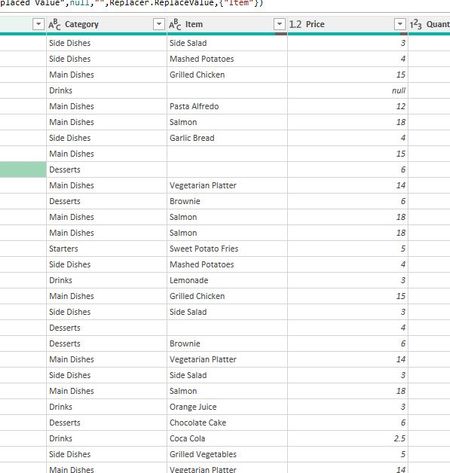
- Jul 04, 2025
IMHO, some additional logic is to be defined. For example, in first table you have records with no values for item and price. In second table there are few records for such category. Not clear which to take - first one, or one with highest price or what.
Same if we have only category and price, but in second table there are few records for that category with the same price. Which one do you select if do that manually?


Kidd_Ip
Jul 04, 2025MVP
How about this:
1: Load Both Tables into Power Query
- Select your main table → Data > From Table/Range → name it MainData.
- Select your reference table → Data > From Table/Range → name it ReferenceData.
2: Merge Queries
- In Power Query, go to MainData.
- Click Home > Merge Queries > Merge Queries as New.
- Select ReferenceData as the second table.
- Match on both Category and Price.
- Use a Left Outer Join (keep all rows from MainData).
3: Expand the Merged Table
- Click the expand icon next to the merged column.
- Select only the Item column from ReferenceData.
- Rename it to Item_Lookup.
4: Fill in the Blanks
- Add a Custom Column:
if [Item] = null then [Item_Lookup] else [Item]
- Name it Final_Item.
- Remove the original Item and Item_Lookup columns.
- Rename Final_Item to Item.
5: Load the Cleaned Data
Click Close & Load to return the cleaned table to Excel.