Forum Discussion

Bar Graph in a Worksheet Cell
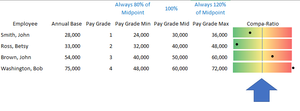

CraftingBuddy I'm not sure if there is a better way but here I tried a couple of tricks:
on the left part of this image is an attempt using Conditional Formatting. It isn't exactly what you want but it IS in cell. I personally would get rid of the gradient that I added and just use the bar graph portion. On the right side of the image is a horizontal bar graph where I added the gradient with 75% transparancy (so you see the cell borders behind it) and removed the horizontal bars lines & fills but added the data points with a custom formatting to only show an asterisks (*). I feel this is visually closer to what you want but it is NOT in-cell but rather sitting on top of the cells and carefully scaled accordingly. The file is attached for you to play with. The 'values' are all based on column F (but 'hidden' using that conditional formatting)
EDIT: I realized I forgot to 'reverse category order' on the graph and while I was at it I added in column H a copy of the values in column F so it is easier to see them.