Forum Discussion

Kevin_Burchell
Nov 30, 2021Copper Contributor
Bar charts switch order
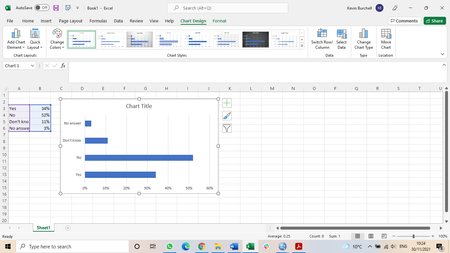
Hi everyone I wonder if someone can help with this challenge that has bugged me for a long time. I make a lot of bar charts in Excel. However, when I set up the data in a spreadsheet, the order of t...

Riny_van_Eekelen
Nov 30, 2021Platinum Contributor
Kevin_Burchell Format the vertical axis to show categories in reverse order, and the set the horizontal axis labels position to be "high".
Attached an example.
 Kevin_BurchellNov 30, 2021Copper ContributorHi Riny
Thank you.
Forgive me, I am confused.
You say format the categories in reverse but you have formatted them (in the spreadsheet) in the right order.
Also, I cannot get the chart properties to show.
In one of my charts, I have now used 'categories in reverse order' in Chart elements-Format axes to get the categories to reverse.
However, I cannot see how to reverse the values.
Anyway, thanks for your help, all the best
Kevin- Riny_van_EekelenNov 30, 2021Platinum Contributor
Kevin_Burchell Bar charts are a bit special. If you have series/categories A,B and C, the chart displays them C,B,A from the top down. Hence you have to reverse the order.
But perhaps now I have lost you. Can upload some examples explaining the problem(s)
- Kevin_BurchellNov 30, 2021Copper ContributorHi Riny
Thank you.
Yes, I know that, that's the problem I raise!
I have solved it now, the 'categories in reverse order' does the job.
Cheers
Kevin