Forum Discussion

AlexEanbu
Sep 18, 2023Tin Contributor
Average
fx= Average of Product from jan to apr? Which Means sum of each month of DVD and their Average?
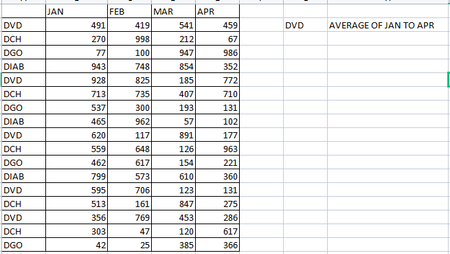
- Sep 18, 2023

HansVogelaar
Sep 18, 2023MVP
Assuming that "product/month" is in A1, enter the following formula in a cell in row 2:
=AVERAGE($B2:$E2)
Fill down.
Or should the rows containing "product 2" be combined? If so, enter the formula
=UNIQUE($A2:$A5) in a cell, for example in P2.
In the cell next to it, enter the formula
=AVERAGE(IF($A$2:$A$5=P2#, $B$2:$E$5))
Adjust the ranges if you have more data rows.
 AlexEanbuSep 18, 2023Tin ContributorCAN U PLS ELOBRATE
- HansVogelaarSep 18, 2023MVP
You changed the screenshot since I composed my reply. My reply was based on the original screenshot.
In H2:
=AVERAGE(IF($A$2:$A$18=G2, $B$2:$E$18))
- AlexEanbuSep 18, 2023Tin ContributorI Dont know , how could it work?
not working bro