Forum Discussion

Automating Data Entry from an Existing Sheet
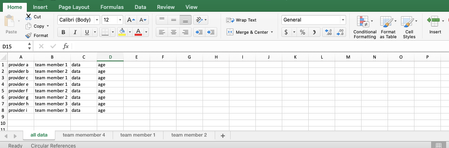
- Aug 26, 2020
ayudame no it will not affect the data in the 'original' sheet but if the data in that original sheet changes like inserting or deleting rows, then the data on the individual sheets will shift accordingly (i.e. bump up or down a row) but the added comments on that individual sheet won't move and will be offset (see example below). IF the original data sheet will never be changed that way then maybe it will be ok, but in my experience it will happen and may wreak havoc to that individual unless they know exactly what/where the change happened and they can shift all their notes accordingly (and god forbid someone decide to sort the sheet...)
That all said, there are 2 other options to consider:
a) have the individual sheets as the true data entry and hence the total/summary sheet would pull the data from the different sheets.
b) have the individual sheet partly independent from the original sheet so each individual sheet would have its own list of reference item numbers/ids and look up the data. You could also have a 'matching' column (a filtered-unique list generated from the original tab) to show to the individual if anything has changed. So for example:
in this image column A is generated from another tab and column B are 'fixed' values (originally copy-paste as values from A). The rest of the data columns (not shown) could be filtered/lookup based on column B or come with column A and column B is a ref column only for their notes. Notice I made some custom notes on a few items, but since then someone added data onto the original sheet so the notes in column C don't line up with the names in column A. But they still line up with the 'matching' values in column B. So the first change I see (and you could add conditional formatting to help highlight the changes) is row 2 that steven was added. So I highlighted row 2 and selected 'insert row' and notice how all the data on the right moves down but it doesn't affect column A (because it is a dynamic array from cell A1). Now Sue lines up with Sue. It isn't ideal but at least the data is preserved.

I like the idea of locking. I understand the conflict.
The team members would like to keep their "additional data" separate from the original sheet "all data" but would like to have the data populate from "all day" to their sheets where they would then add the other that wouldn't belong in the original sheet "all data" sheet mtarler are you then saying its not logically possible?
does this [the problem is that if the original data sheet changes the filtered or pivot data will change and will not move or change "additional" data that may have been entered to the right of it as "additional information"] mean that if additional info is added into their individual sheets it will negatively/alter the data in the original sheet.
appreciate the help.

ayudame no it will not affect the data in the 'original' sheet but if the data in that original sheet changes like inserting or deleting rows, then the data on the individual sheets will shift accordingly (i.e. bump up or down a row) but the added comments on that individual sheet won't move and will be offset (see example below). IF the original data sheet will never be changed that way then maybe it will be ok, but in my experience it will happen and may wreak havoc to that individual unless they know exactly what/where the change happened and they can shift all their notes accordingly (and god forbid someone decide to sort the sheet...)
That all said, there are 2 other options to consider:
a) have the individual sheets as the true data entry and hence the total/summary sheet would pull the data from the different sheets.
b) have the individual sheet partly independent from the original sheet so each individual sheet would have its own list of reference item numbers/ids and look up the data. You could also have a 'matching' column (a filtered-unique list generated from the original tab) to show to the individual if anything has changed. So for example:
in this image column A is generated from another tab and column B are 'fixed' values (originally copy-paste as values from A). The rest of the data columns (not shown) could be filtered/lookup based on column B or come with column A and column B is a ref column only for their notes. Notice I made some custom notes on a few items, but since then someone added data onto the original sheet so the notes in column C don't line up with the names in column A. But they still line up with the 'matching' values in column B. So the first change I see (and you could add conditional formatting to help highlight the changes) is row 2 that steven was added. So I highlighted row 2 and selected 'insert row' and notice how all the data on the right moves down but it doesn't affect column A (because it is a dynamic array from cell A1). Now Sue lines up with Sue. It isn't ideal but at least the data is preserved.
- ayudameAug 27, 2020Copper Contributor
Thank you for this thorough explanation. I am going to bring up these concerns at the upcoming meeting and decide what works best for everyone. But so far this has done a GREAT deal of help, seriously. I was working on this for about a week with nothing working. mtarler