Forum Discussion

Automating Data Collection Across Non-Sequentially-Named Sheets and Workbooks
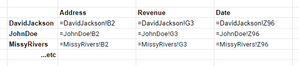

mathetes unfortunately, I didn't have any control over the design or collection stages of the project or this could have been avoided at the start.
At this point going back and rebuilding everything is well outside of scope for the project, so I have to make the best of what I've got.

Let me add, then, in addition to the suggestions you've gotten from mtarler , that you look into the INDIRECT function. I use that on one of my more ambitious workbooks (dealing with investing in various issues) where I use a formula like this
=INDIRECT($B5)&"!"&A$1)
to refer to the sheet with the name found in B5 (column B contains a list of sheet names of other sheets in the workbook)
and A$1 refers to a specific cell in whatever sheet is named by B5.
That formula, with its absolute and relative references is used to populate a summary sheet built from individual sheets that, like yours, have common data in the same cells. In your case, this would require a one-time effort (perhaps a macro?) to create in the Summary sheet a column with each sheet's name.
I'm attaching a copy of a sample of that workbook. The "Current Summary" sheet is the one that uses INDIRECT
Here, too, is a good website for further info on using INDIRECT. https://exceljet.net/excel-functions/excel-indirect-function