Forum Discussion

AnachronisticJam
Sep 22, 2021Copper Contributor
Automating Data Collection Across Non-Sequentially-Named Sheets and Workbooks
I just had a project dropped in my lap that is a classic conflict between human-readable and machine-readable formats. I need to collect data across hundreds of sheets that were designed to be hu...

mtarler
Sep 22, 2021Silver Contributor
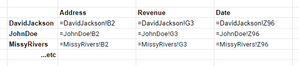
AnachronisticJam so assuming a couple things these formulas might help you.
a) you need the sheet name to be added to each sheet. so let's pretend cell A1 is available then add this formula there:
=LET(path,CELL("filename",A1),RIGHT(path,LEN(path)-SEARCH("]",path)))b) you can then create the list of all sheet names using this formula which only requires you to enter the first and last sheet names and the cell from a) above:
=LET(sref,Sheet1:Sheet5!A1,TRIM(MID(TEXTJOIN(REPT(" ",100),,sref),SEQUENCE(COUNTA(sref),,1,100),100)))c) you can then create the remaining lookup values using INDIRECT() combining the sheet name from b) with the absolute cell reference you need