Forum Discussion

Automatically merge cells within range while entering highest count
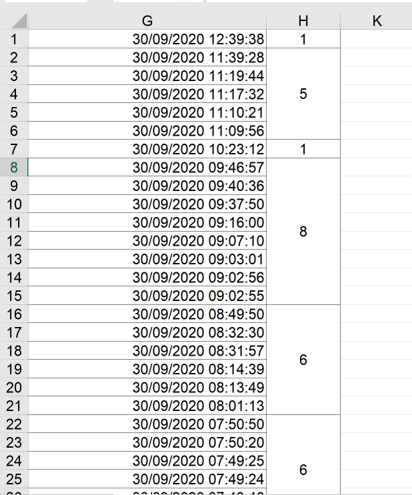

A Formula cannot merge cells but can return the count based on your criteria only.
If you want to merge the cells based on the criteria as well, you will need VBA to achieve this.
Place the following code on a Standard Module like Module1 and activate the sheet in which you want to count and merge the cells and run the macro on Module1 then.
On Sheet1 in the attached, I have placed some dummy date time stamps in column G and inserted a button called "Count and Merge" , you may click this button to run the code to get the desired output.
Sub CountCellsForSameHours()
Dim lr      As Long
Dim i       As Long
Dim j       As Long
Dim rng     As Range
Dim found   As Boolean

Application.ScreenUpdating = False
Application.DisplayAlerts = False

lr = Cells(Rows.Count, "G").End(xlUp).Row

For i = 1 To lr
    If IsDate(Cells(i, "G")) Then
        If Not found Then Set rng = Cells(i, "H")
        If Hour(Cells(i, "G")) = Hour(Cells(i + 1, "G")) Then
            found = True
            j = j + 1
        Else
            Set rng = rng.Resize(j + 1)
            rng.Merge
            rng.Value = j + 1
            rng.HorizontalAlignment = xlCenter
            rng.VerticalAlignment = xlCenter
            Set rng = Nothing
            j = 0
            found = False
        End If
    End If
Next i
Application.ScreenUpdating = True
End Sub

Subodh_Tiwari_sktneer
Thank you for the quick reply ... everything works great accept for the merged cells for the earliest hour located at the very bottom (see screenshot) ... for some reason it is not merging and adding the counted result.
- Subodh_Tiwari_sktneerOct 03, 2020Silver Contributor
Can you please upload the file with the issue?
- lhvinskyOct 03, 2020Copper Contributor
- Subodh_Tiwari_sktneerOct 03, 2020Silver Contributor