Forum Discussion

Automatically Insert Row in Another Sheet If a row is added (MS 2021)
- Dec 15, 2023
Hi elianaelia
My understanding is you have such a Table in say WorkbookProjects:
You want the same table in say WorkbookProjectHours (for employee hour entries) and when you add/delete Projects and/or Dates in WorkbookProjects this should be reflected in WorkbookProjectHours
#1 Is this a good summary or did I misunderstand something?
#2 In term of process what happen/should happen between the end of a month and the beginning of the next month (cf. where the employees will manually add the hours they worked for each project for that month)?
#3 Could you post a picture of your table projects in WorkbookProjects?
#4 Do you happen to Sort the projects in WorkbookProjects?

Hello Lorenzo
No, I do not experience the same with Excel 2021 when I use the code you sent.
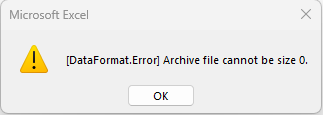
However, now I am experiencing another problem with the pivot table in the source file. Even though I have not made any change that table does not retrieve any new data inserted in the employee files with the error "Archive file cannot be 0."
I have not checked yet if Disabling Hardware graphics acceleration solves the issue but I will do so soon and I will update you.
I have sent you privately the files.
Thank you so much for all the assistance and help you have provided me!!!

Hello elianaelia
Thanks for sharing files
Re "Archive file cannot be 0" when refreshing the PivotTable in ProjectsSourceWorkbook:
- I copied the 2 TimeTracking files in a local folder
- Updated the Full path to Workbook Source Projects + re-hidded the PARAM sheet
- Added some hours on the DummyEmpl file
- Updated the Full path to Directory with Employee sub-folders in the ProjectsSourceWorkbook
and Refreshed the PivotTable no problem
So, made a quick search on the Net ==> https://community.fabric.microsoft.com/t5/Service/Refresh-error-Archive-file-cannot-be-size-0/m-p/1996691
So check the content of your \\192.xxx.yy.z\homes Folder hierachy