Forum Discussion

Automatically Insert Row in Another Sheet If a row is added (MS 2021)
- Dec 15, 2023
Hi elianaelia
My understanding is you have such a Table in say WorkbookProjects:
You want the same table in say WorkbookProjectHours (for employee hour entries) and when you add/delete Projects and/or Dates in WorkbookProjects this should be reflected in WorkbookProjectHours
#1 Is this a good summary or did I misunderstand something?
#2 In term of process what happen/should happen between the end of a month and the beginning of the next month (cf. where the employees will manually add the hours they worked for each project for that month)?
#3 Could you post a picture of your table projects in WorkbookProjects?
#4 Do you happen to Sort the projects in WorkbookProjects?

Hi elianaelia
- Select (all) the following query code and copy it to the Clipboard (Ctrl+C):
(table_project_hours as table, short_month as text) as table =>
let
    SourceProjects = Table.AddIndexColumn(
        Table.SelectColumns(
            Table.SelectRows(SourceWbookProjectsTable, each ([Month] = short_month)),
            {"ΕΡΓΟ"}
        ),
        "IDX_PROJECT", 0, 1
    ),
    SourceProjectHours = table_project_hours,
    ProjectHoursColumnNames = List.Buffer(
        List.RemoveItems(
            Table.ColumnNames(SourceProjectHours),
            {"ΕΡΓΟ", "Total"}
        )
    ),
    MergedTables = Table.NestedJoin(
        SourceProjects, {"ΕΡΓΟ"},
        SourceProjectHours, {"ΕΡΓΟ"},
        "PROJECT_HOURS", JoinKind.LeftOuter
    ),
    ExpandedProjectHours = Table.ExpandTableColumn(MergedTables,
        "PROJECT_HOURS", ProjectHoursColumnNames
    ),
    SortedIdxProject = Table.Sort(ExpandedProjectHours,{{"IDX_PROJECT", Order.Ascending}}),
    RemovedIdxProject = Table.RemoveColumns(SortedIdxProject,{"IDX_PROJECT"}),
    AddedTotal = Table.AddColumn(RemovedIdxProject, "Total", each
        List.Sum(
            Record.FieldValues(
                Record.SelectFields(_, ProjectHoursColumnNames)
            )
        )
    )
in
    AddedTotal
- Open the EmployeeTrackingHours file
- Go to Data(tab) > Queries & Connections. The Queries & Connections pane should appear on the right side of the screen:
- Right-click on query 'UpdateProjectHoursTable' > Edit (Power Query Editor opens)
- In the Home tab > Advanced Editor:
- Select all (Ctrl+A) > Paste (Ctrl+V) from the Clipboard
- Click Done (bottom right)
- Close & Load (1st button on the left of the toolbar
- Save the file & Close it
- Ask the user to ckeck this now works before implementing the same change for the others
NB: Users with Excel version > 2016 can also use same query code - Implemented in attached file '2024-EmployeeTimeTracking_DummyEmpl_NEW_BLANK.xlsx'
If you want to explaination let me know

So I would need to copy the below code in every tracking file or just to the 2016 excel files?
Thank you a lot for your help!!!!
- elianaeliaMay 08, 2024Brass Contributor
Dear Lorenzo Lorenzo ,
It seems that I will need your help again. I need to disable the columns for the weekends, add sum for the weeks (I want to add a validation rule not to exceed the 40 hours) and sum for each day (with a validation rule not to exceed the 8 hours).
I know how to add the validation rules, the problem is how to add the sums so when new projects are added, no data to be overlapped.
Could you please help me Lorenzo ?
Many thanks in advance!!
- LorenzoJan 19, 2024Silver Contributor
See my Private Message with an update version of the ProjectsSourceWorkbook...
- LorenzoJan 19, 2024Silver Contributor
Re. Disabling Hardware graphics acceleration does not solve the issue
On the Employee PC
- Open the TimeTracking workbook
- Go to Home (tab) > Cell Style > Right-click on 'Normal' > Modify...- Format... > Font (tab) > Select 'Calibry (Body)' in the list
- OK > OK
- Save the file > Close it > Re-open it and see how it goesHope this will fix the issue as I'm out of ideas...
- LorenzoJan 19, 2024Silver Contributor
Hello elianaelia
Thanks for sharing files
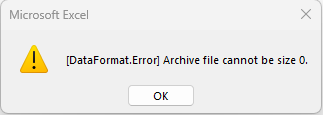
Re "Archive file cannot be 0" when refreshing the PivotTable in ProjectsSourceWorkbook:
- I copied the 2 TimeTracking files in a local folder
- Updated the Full path to Workbook Source Projects + re-hidded the PARAM sheet
- Added some hours on the DummyEmpl file
- Updated the Full path to Directory with Employee sub-folders in the ProjectsSourceWorkbook
and Refreshed the PivotTable no problem
So, made a quick search on the Net ==> https://community.fabric.microsoft.com/t5/Service/Refresh-error-Archive-file-cannot-be-size-0/m-p/1996691
So check the content of your \\192.xxx.yy.z\homes Folder hierachy
- elianaeliaJan 19, 2024Brass Contributor
- elianaeliaJan 19, 2024Brass Contributor
Hello Lorenzo
No, I do not experience the same with Excel 2021 when I use the code you sent.
However, now I am experiencing another problem with the pivot table in the source file. Even though I have not made any change that table does not retrieve any new data inserted in the employee files with the error "Archive file cannot be 0."
I have not checked yet if Disabling Hardware graphics acceleration solves the issue but I will do so soon and I will update you.
I have sent you privately the files.
Thank you so much for all the assistance and help you have provided me!!!
- LorenzoJan 15, 2024Silver Contributor
Wow (???) No idea at all why a query would be responsible of something like that
I just did a couple of tests here and with no suprise I can't repro. the issue
Could you:
- Check if you experience the same with your Excel 2021?
- On the user PC see if Disabling Hardware graphics acceleration solves the issue
- Send me in a Private Message the ProjectsSourceWorkbook and the EmployeeTrackingWorkbook you updated
- elianaeliaJan 15, 2024Brass Contributor
It worked, I saw the new projects that I have added in the source file but after a few seconds the cells turn to black.
- LorenzoJan 15, 2024Silver Contributor
You must implement the change to the Tracking files of all users running Excel 2016
You don't need to do it for those running Excel 2021 but you can
Hope this clarifies things otherwise let me know