Forum Discussion

Catok
May 25, 2023Copper Contributor
Automatically change tables based on data from one cell.
Hi everyone! Need help! In the image you can see spotted areas here is the formulae: =IF(INDEX(Rota14[[MON]:[SAT]],MATCH(CO16,date[W/C Date],0),MATCH(CR17,Rota14[[#Headers],[MON]:[SAT]],0)...
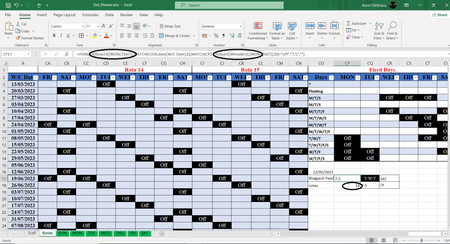

NikolinoDE
May 25, 2023Platinum Contributor
To dynamically change the table reference in your formula based on the value in cell CP18, you can modify the formula as follows:
=IF(INDEX(INDIRECT(CONCATENATE(CP18,"[[MON]:[SAT]]")),MATCH(CO16,date[W/C Date],0),MATCH(CR17,INDIRECT(CONCATENATE(CP18,"[[#Headers],[MON]:[SAT]]")),0))="off","7.5","")
In the modified formula, the INDIRECT function is used to dynamically construct the table reference based on the value in cell CP18. The CONCATENATE function is used to concatenate the table name ("Rota") with the desired range ("[[MON]:[SAT]]" and "[[#Headers],[MON]:[SAT]]").
By using INDIRECT with CONCATENATE, the formula will evaluate the resulting text as a valid table reference. This allows you to change the table reference by simply changing the value in cell CP18.
=IF(INDEX(INDIRECT(CONCATENATE(CP18,"[[MON]:[SAT]]")),MATCH(CO16,date[W/C Date],0),MATCH(CR17,INDIRECT(CONCATENATE(CP18,"[[#Headers],[MON]:[SAT]]")),0))="off","7.5","")
In the modified formula, the INDIRECT function is used to dynamically construct the table reference based on the value in cell CP18. The CONCATENATE function is used to concatenate the table name ("Rota") with the desired range ("[[MON]:[SAT]]" and "[[#Headers],[MON]:[SAT]]").
By using INDIRECT with CONCATENATE, the formula will evaluate the resulting text as a valid table reference. This allows you to change the table reference by simply changing the value in cell CP18.

Catok
May 26, 2023Copper Contributor
unfortunately it didn't work