Forum Discussion

Jayanta85
Jun 06, 2023Copper Contributor
Autofill data from in excel
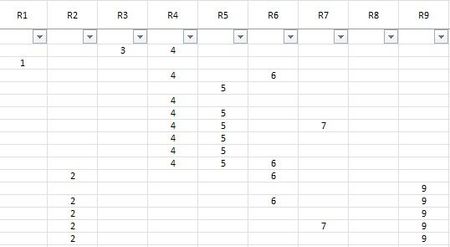
I have 9 column and several rows but i have less value in the same rows. I need to fill the data from R1, R2, R3 if have more then R4. But if R value in first row is blank and I need to ...

Lorenzo
Jun 06, 2023Silver Contributor
I have a large data sheet (how many records does this mean +/- ???) With Power Query (attached):

Jayanta85
Jun 06, 2023Copper Contributor
Can you send me the process that you do in Power Query?
- LorenzoJun 06, 2023Silver Contributor
> HOW TO Create, load, or edit a query in Excel
Edit query TableOut > From the Home tab choose Advanced Editor to see the query code:
let
    Source = TableIn,
    CombinedValues = Table.AddColumn(Source, "Values", each
        List.RemoveNulls(Record.ToList(_)), type list
    ),
    RemovedOtherColumns = Table.SelectColumns(CombinedValues,{"Values"}),
    ExtractedValuesAsString = Table.TransformColumns(RemovedOtherColumns,
        {"Values", each Text.Combine(List.Transform(_, Text.From), ";"), type text}
    ),
    SplitColumnByDelimiter = Table.SplitColumn(ExtractedValuesAsString, "Values",
        Splitter.SplitTextByDelimiter(";", QuoteStyle.Csv), Table.ColumnNames(Source)
    ),
    TypedColumns = Table.TransformColumnTypes(SplitColumnByDelimiter,
        List.Transform(Table.ColumnNames(Source), each {_, type number})
    )
in
    TypedColumns
PS: Marking one working option you got as Solution helps people who Search - Thanks