Forum Discussion

AnusornKh
Apr 25, 2023Copper Contributor
Auto-Refresh textbox in Realtime if Value Changes
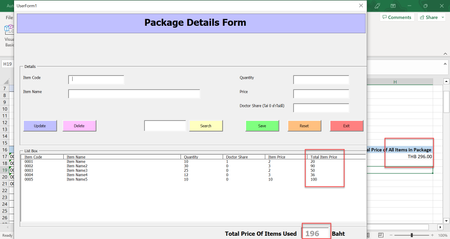
Hi guys, I have created a Userform using VBAs. there is a textbox (txt.TotalPrice) that references the value from my Worksheet cell H17 It shows the data correctly but i also want it to u...

Rodrigo_
Apr 25, 2023Steel Contributor
AnusornKh
Try this approach:
You can add a timer to your userform and update the textbox value in the timer event. Here's an example code:
First, add a timer control to your userform from the toolbox (if it's not already there) and set its interval to the desired time (in milliseconds), for example, 1000 for 1 second.
Then, add the following code to your userform module:
Private Sub UserForm_Initialize()
    txtTotalPrice.Value = Sheets("Worksheet").Range("H17").Value
    Me.Timer1.Enabled = True ' start the timer
End Sub

Private Sub Timer1_Timer()
    txtTotalPrice.Value = Sheets("Worksheet").Range("H17").Value ' update the textbox value
End Sub
This will update the value in the textbox every time the timer interval elapses (in this case, every second). Note that you may need to adjust the interval based on your needs and the performance of your system.

AnusornKh
Apr 25, 2023Copper Contributor
Is it possible if you could help me with the
Timer module? what code to add for "Add a timer control to your userform from the toolbox (if it's not already there) and set its interval to the desired time (in milliseconds),"
Thanks
Timer module? what code to add for "Add a timer control to your userform from the toolbox (if it's not already there) and set its interval to the desired time (in milliseconds),"
Thanks
- HansVogelaarApr 26, 2023MVP
A timer control is available in VB, not in VBA in Excel.
