Forum Discussion

Diane van Niekerk
Oct 08, 2018Copper Contributor
Auto merging columns under specified conditions ONLY
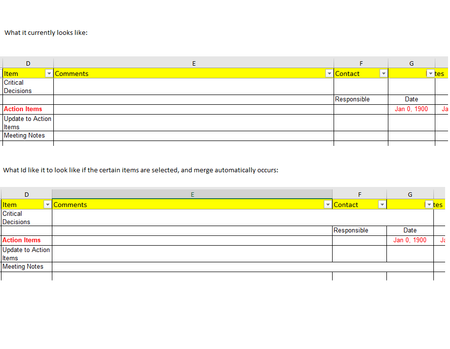
Hello all - I am trying to figure out how to merge columns in a spreadsheet, under a specified condition. Hopefully I can explain this clearly.... Situation: I have created a drop down list in colum...

Haytham Amairah
Oct 08, 2018Silver Contributor
Hi,
Yes, it's possible!
But you need to inject the worksheet with some lines of VB code to get that done!
I would suggest this code:
Sub Worksheet_Change(ByVal Target As Range)

 On Error Resume Next
 Application.DisplayAlerts = False

 If Not Intersect(Target, Range("D:D")) Is Nothing Then
    If Target.Value = "Home" Or _
       Target.Value = "House" Then

       Target.Offset(0, 1).Resize(1, 3).Merge
    Else
       Target.Offset(0, 1).Resize(1, 3).UnMerge
    End If
 End If

 Application.DisplayAlerts = True
 On Error GoTo 0

End Sub
To apply this code, please hover the Mouse over the Worksheet tab, right-click, and select View Code.
Then copy and paste it into the worksheet code module.
After that, save the workbook as .xlsm file extension to keep the code saved in it.
But, don't forget to change the Target.Value to make it fits your needs as the below syntax:
    If Target.Value = "Specific_Item_1" Or _
       Target.Value = "Specific_Item_2" Or _
       Target.Value = "Specific_Item_3" Then
Please find an example of this in the attached file
Hope that helps

Diane van Niekerk
Oct 08, 2018Copper Contributor
OMGosh - you are the BEST. Thank you , it worked beautifully!!!!