Forum Discussion

tss808
Jan 17, 2022Copper Contributor
Applying editing to imported data
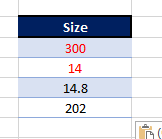
Hi all, I'm importing data from a third party excel worksheet to my own database. The source unfortunately have already edited their data to display negative numbers in red having removed the - sign...
- Jan 17, 2022
Hello, attached is an example using VBA. It works for the color red.
It is going to do an "if the color is red" then change the sign to negative else "leave the value as it is".


mtarler
Jan 17, 2022Silver Contributor
if this is coming from excel those numbers are most likely just formatted that way and the actual VALUE is still a negative number. Hence if you just change the number format you can have it shown as black with "-" sign or inside brackets [ neg number ] or any way you wish. Look at Home tab, number formats

tss808
Jan 17, 2022Copper Contributor
Unfortunately not. I should qualify and say that this data has been pasted onto an email from a source file. I can copy and paste the cells and it retains the color but no other way to identify positive or negative other than colour.
- alannavarroJan 17, 2022Iron Contributor
Hello, attached is an example using VBA. It works for the color red.
It is going to do an "if the color is red" then change the sign to negative else "leave the value as it is".
- mtarlerJan 18, 2022Silver Contributornice but I wonder if his color is "Red" or just some shade of red. I haven't opened your code so maybe it already does this, but what might be nice is a way to find any color similar to red. You can get the RGB value and I don't know but maybe any case where R is > G and > B (I'm really no color expert so have no idea what would define shades of red).