Forum Discussion

Advanced Threat Protection - Safe Links
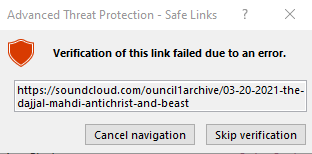
 Feb 27, 2023
I thought I would update everyone from my post prior.
I engaged the help of two of our top IT experts at my company. They talked with other "experts" and in the end they came back with....."Sorry, but we cannot figure this one out."
The odd thing is that this does NOT affect other MS programs or apps. I have tested this over and over and it works just fine in Word, Publisher, or even PowerPoint. No problem opening up an active hyperlink. Heck, I can even print my SPREASHEET in Excel over to an Adobe PDF and guess what? That opens flawlessly without the delays! No errors.
This is ONLY happening in Excel and ONLY since that last big update they had for Office 365.
I am learning to just live with it and hope that one day down the road MS figures this out and does fix it. But when all these big shots and experts with Microsoft and Excel specifically.....can't figure this out? I don't have a lot of hope left on this fix. But I sure wish someone from MS would pay attention to this and figure it out.
Mark

I, too, am experiencing this issue in both Excel and Word. The problem has only started affecting my workgroup in the last month or so. Workbooks that worked just fine in pre-2023 days are now showing this dialog. Sometimes just momentary and others it "locks" Excel until you either "Cancel navigation" or "Skip verification". I am currently running
Microsoft® Excel® for Microsoft 365 MSO (Version 2211 Build 16.0.15831.20220) 64-bit
and
Microsoft® Word for Microsoft 365 MSO (Version 2211 Build 16.0.15831.20220) 64-bit
I thought I would update everyone from my post prior.
I engaged the help of two of our top IT experts at my company. They talked with other "experts" and in the end they came back with....."Sorry, but we cannot figure this one out."
The odd thing is that this does NOT affect other MS programs or apps. I have tested this over and over and it works just fine in Word, Publisher, or even PowerPoint. No problem opening up an active hyperlink. Heck, I can even print my SPREASHEET in Excel over to an Adobe PDF and guess what? That opens flawlessly without the delays! No errors.
This is ONLY happening in Excel and ONLY since that last big update they had for Office 365.
I am learning to just live with it and hope that one day down the road MS figures this out and does fix it. But when all these big shots and experts with Microsoft and Excel specifically.....can't figure this out? I don't have a lot of hope left on this fix. But I sure wish someone from MS would pay attention to this and figure it out.
Mark
- Therrion71Feb 28, 2023Tin Contributor
Update… I purchased a new Laptop and moved over all the files that I wanted to keep through One Drive onto the new laptop and problem has disappeared for me. Thank you Lord!!
- Mark_ClaessensMar 01, 2023Tin ContributorTherrion....I am sorry, but I just thought of one more thing. Yes, you bought a new laptop. But did you make sure that both the operating system and your versison of office 365 were both 100% up to date with MS? Just curious.
- Therrion71Mar 02, 2023Tin Contributor
Yes when I installed all the programs it updated to the most current version of MS 360.
- Mark_ClaessensMar 01, 2023Tin ContributorThanks, Therrion! That is awesome news and I am truly happy for you. Unfortunately, I have a newer laptop that is awesome and am not willing to try that. But let me share this, too.
I sent one of my Excel files to one of the top IT guys here. I asked him to open that up at that time. He initially told me that when he clicked a hyperlink, it opened just fine with no errors. But then he asked me what version of office 365 and Windows I was running over here. I told him. He said, "Hmmm....yours is more updated than mine. I guess I need to do the Windows update. " Then he did. As soon as he did the windows or office update....BAM! He then experienced the same issue. Funny, huh?
Therrion....I have a question. Would you be open to running a test with me? What I was thinking is if we privately did this, of course. I would be willing to send you one of my Excel files and then I would be curious if you opened up that file....if the links would open up just fine. But then, a reverse test. Maybe you could create a brand new Excel file and either hand-type one or two of the hyperlinks in there, or also try copying and pasting in a couple. Then you could email that back to ME and see if that would work on my end. Because maybe this has something to do with the CREATION of the doc. I obviously tried this on my end here, by creating a new Excel file, and both hand typing in a hyperlink, and also copying and pasting. But neither of those options worked. And I don't know what the rules are here for sharing an email address. But I would be more than happy to do that if you would be willing to give this a shot.- Therrion71Mar 02, 2023Tin Contributor
Sure thing. You can send me an email at therrion71 over at Yahoo dot com
