Forum Discussion

Advanced Filter
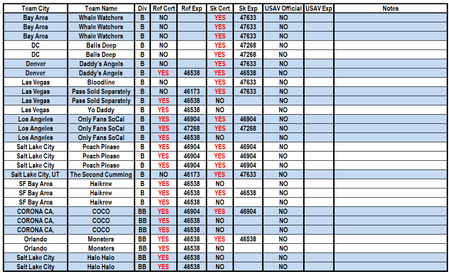

The FILTER criteria are fine; the trailing concatenation is causing the result problem. In Excel, dates are stored as serial numbers, and the & operator converts values to text. Your IF also checks only I3, then appends that single result to every cell in the spilled array, so formatting cannot reliably restore the dates. Start with =FILTER(C3:N500,((H3:H500="YES")+(J3:J500="YES"))>0,""). Then format the spilled Ref Exp and SK Exp columns as Date. If source blanks are displayed as zero, use =LET(x,FILTER(C3:N500,((H3:H500="YES")+(J3:J500="YES"))>0,""),IF(x="","",x)). That preserves the filtered two-dimensional shape and substitutes an empty string wherever the returned source cell is blank. Do not append I3 to the array. Also confirm that the expiration cells contain real Excel dates rather than imported text by testing one with ISNUMBER. If it returns FALSE, convert that source column to dates before filtering. Using an Excel Table with structured references will also let the formula expand automatically.