Forum Discussion

Adding number in the same table
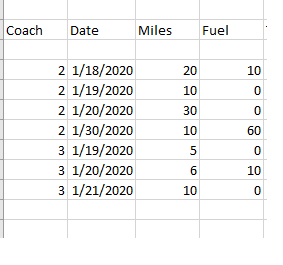

Would you permit me not to answer you directly? You mention knowing DAX but not Excel. I'd never heard of DAX, so went here https://docs.microsoft.com/en-us/dax/ and discovered it's a Microsoft software tool also and that it explicitly very closely resembles Excel in many of its functions.
So let me challenge you first to realize that in Excel you can play around with those tentative entries and not need to worry about breaking anything. Perhaps the one thing you might need (as I said, I don't know DAX's way of writing a formula), is that in Excel you begin any formula or entry of a Function with the equals sign. So other than the cells where there's a number, you'd enter =10+20, not just 10+20. Or for your conditionals, it'd be =IF(.....) but what that DAX page tells me is that IF function in Excel is just the same as IF in DAX
Be bold....try out the knowledge you already have. Then come back if you can't solve it on your own. My guess is that you can.

As always I need this done yesterday. If you can give me some clue I would appropriate.
Yes I know Power BI and DAX but exel is so different and new.
Thanks
- mtarlerApr 20, 2020Silver Contributor
Tia Rojas ah Mathetes is ever the teacher. I will be the bad student...
assuming "miles" is in Col. C then I believe what you want is:
Col E "Total Miles" would be
=if(d2=0,c2+e1,0)
and Col F "Sum of Miles" would be
=if(d2=0,0,c2+e1)
- Tia RojasApr 20, 2020Copper Contributor
Thank you for the help. That is not going to work because I am in the process of creating the e column.
I need to do something like this:
If fuel <> 0 then Total miles = 0 and h=0 <--- I will have to add a new column to save a value
If fuel = 0 then Total mile = Miles + h and h= miles
If fuel <> 0 then Sum Numbers = Miles + Total Miles
if Fuel = 0 Then Sum Numbers = 0
This will give the correct values for columns e=Total Miles and f=Sum number
I can program in DAX and Java or any object oriented langue so I am finding exxel difficult.
Thank you
- mtarlerApr 20, 2020Silver Contributor
Tia Rojas I think your trouble might be in understanding that in Excel the "Formula" in the cell is hidden and used to show the RESULT of that formula. So if you type a formula like =A1+B1 in a cell you don't see that text but instead the result of A1+B1.
So if you paste the formula I gave you in the columns where you need those answers they will show the results you want. Try it out, I think you'll catch on quickly.
