Forum Discussion

Adding a unique customer # after every 5th row
 Apr 01, 2024
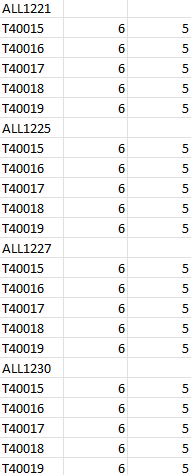
Sub items() Dim i, j As Long Range("A:C").Clear j = 1 For i = 1 To 1200 If i Mod 6 = 1 Then Cells(i, 1).Value = Cells(j, 11).Value j = j + 1 Else Select Case i Mod 6 Case Is = 2 Cells(i, 1).Value = "T40015" Case Is = 3 Cells(i, 1).Value = "T40016" Case Is = 4 Cells(i, 1).Value = "T40017" Case Is = 5 Cells(i, 1).Value = "T40018" Case Is = 0 Cells(i, 1).Value = "T40019" End Select Cells(i, 2).Value = 6 Cells(i, 3).Value = 5 End If Next i End SubIn the attached file you can click the button in cell E2 to run the macro which enters the unique customer id's from range K1:K200 in column A.

OliverScheurichThank you so very much. This is so helpful  It would usually take me over an hour to do this whereas now I can do this in seconds. Amazing!!
I wanted to ask if each item has different cost and quantity, how would I go about updating in the code?
Also, is it possible to make the following changes to the code/file when I run macro?
- Insert a new column to the left where word "HEADER" is assigned to each customer # and word "LINE" is assigned to each item #. This will be column A
- Move all customer #s to column C just above the first quantity for each item
- Add word "NEXT" for each customer # in column B which would be adjacent to customer # and the header column A.
The website is not letting me attach the file so, I've copied the screenshot of changes (highlighted in yellow) that I'd like to see in the file. Thanks again 
Sub items()

Dim i, j, k As Long

Range("A:D").Clear

j = 1
k = 0
For i = 1 To 1200

If i Mod 6 = 1 Then

k = k + 1

Cells(i, 1).Value = "HEADER"
Cells(i, 2).Value = "NEXT"
Cells(i, 3).Value = Cells(j, 11).Value
j = j + 1

Else

Cells(i, 1).Value = "LINE"

Select Case i Mod 6

Case Is = 2
Cells(i, 2).Value = "T40015"
Cells(i, 3).Value = Cells(k, 12).Value
Cells(i, 4).Value = Cells(k, 13).Value

Case Is = 3
Cells(i, 2).Value = "T40016"
Cells(i, 3).Value = Cells(k, 14).Value
Cells(i, 4).Value = Cells(k, 15).Value

Case Is = 4
Cells(i, 2).Value = "T40017"
Cells(i, 3).Value = Cells(k, 16).Value
Cells(i, 4).Value = Cells(k, 17).Value

Case Is = 5
Cells(i, 2).Value = "T40018"
Cells(i, 3).Value = Cells(k, 18).Value
Cells(i, 4).Value = Cells(k, 19).Value

Case Is = 0
Cells(i, 2).Value = "T40019"
Cells(i, 3).Value = Cells(k, 20).Value
Cells(i, 4).Value = Cells(k, 21).Value

End Select

End If


Next i

End Sub
You are welcome. I'm glad you found my suggestion helpful.
You can run the adjusted macro in the attached file by clicking the button in cell F2. In this example the different cost and quantity for an item are in the adjacent columns to the customer # in column K. For example for the customer in K1 the cost and quantity for item T40015 are in cells L1 and M1 and the cost and quantity for item T40016 are in cells N1 and O1 and so on.
- Gurpreet20Apr 08, 2024Copper Contributor