Forum Discussion

Adding a new formula to list
- Mar 18, 2022
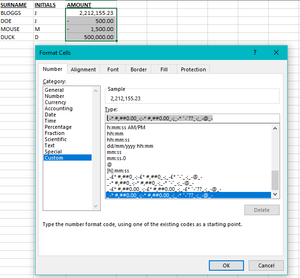
Perhaps it could go with this workaround... predefine and use as a standard template.
...is just a thought 🙂
Save cell styles to use in all new workbooks
If you want to make the cell styles that you create in or copy into a workbook available in all future workbooks, you can save them in a template that is used for all new workbooks.
After you exit and restart Excel, the cell styles that you saved in your template workbook will be available in all new workbooks that you create.
Hope I was able to help with this info.
I know I don't know anything (Socrates)

Perhaps it could go with this workaround... predefine and use as a standard template.
...is just a thought 🙂
Save cell styles to use in all new workbooks
If you want to make the cell styles that you create in or copy into a workbook available in all future workbooks, you can save them in a template that is used for all new workbooks.
After you exit and restart Excel, the cell styles that you saved in your template workbook will be available in all new workbooks that you create.
Hope I was able to help with this info.
I know I don't know anything (Socrates)
 Hanlie_EngelbrechtMar 19, 2022Copper ContributorHi, This works like a bomb.... thank you soo much for this idea. Had to do it a couple of time, because I did not follow the steps right to the end, but eventually I woke up and realise that there are more steps. It is magic! Thank you so much.!