Forum Discussion

Hanlie_Engelbrecht
Mar 18, 2022Copper Contributor
Adding a new formula to list
Morning, I have a preferred formula that I use in Excel, so I have it on a post-it and have to copy it in Excel everytime that I open a new excel file. How do I get this formula: _(* #,##0.00_);[R...
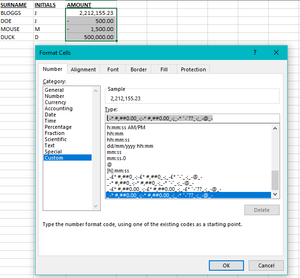
- Mar 18, 2022
Perhaps it could go with this workaround... predefine and use as a standard template.
...is just a thought 🙂
Save cell styles to use in all new workbooks
If you want to make the cell styles that you create in or copy into a workbook available in all future workbooks, you can save them in a template that is used for all new workbooks.
After you exit and restart Excel, the cell styles that you saved in your template workbook will be available in all new workbooks that you create.
Hope I was able to help with this info.
I know I don't know anything (Socrates)


Starrysky1988
Mar 18, 2022Iron Contributor
If you want to include your format in every new excel file is not possible without using addin or VBA.
Why don't you open your file that the format is already in instead of opening the new file in excel and save as the file name you want.
Formatting is actually not hard to remember.
You can just write as below.
0.00;-_(* 0.00;0
The first one before semicolon is formatting for positive value that is "0.00".
The middle one is for negative value that is "-_(* 0.00".
If you want to change the cell color to red, you just add [red] infront of the format that is "[red]-_(* 0.00".
And the last one is for zero that is "0".
Why don't you open your file that the format is already in instead of opening the new file in excel and save as the file name you want.
Formatting is actually not hard to remember.
You can just write as below.
0.00;-_(* 0.00;0
The first one before semicolon is formatting for positive value that is "0.00".
The middle one is for negative value that is "-_(* 0.00".
If you want to change the cell color to red, you just add [red] infront of the format that is "[red]-_(* 0.00".
And the last one is for zero that is "0".
 Hanlie_EngelbrechtMar 18, 2022Copper Contributor
Starrysky1988
Thanks a million for the explanation. Maybe if I understood the actual formula better it would have been easier. This will make it easier for me.
Thanks.