Forum Discussion

Denise82
Apr 15, 2021Copper Contributor
Add the sum in Pivot chart
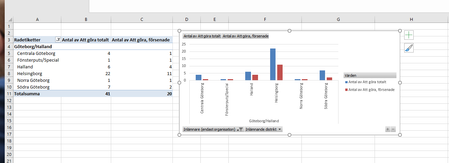
When creating a pivot chart from pivot table with total sum- the total sum won't show in the chart- how do I add this? I don't want to make another table with just numbers somewhere else and make a s...

Subodh_Tiwari_sktneer
Apr 15, 2021Silver Contributor
If you are talking about showing the Column Grand Totals in the Pivot Chart, you may insert CheckBoxes in your Pivot Chart to show them. To do so follow these steps...
- first of all make sure that the Generate GetPivotData option is checked in Pivot Table Options. Refer to the screenshot below to confirm that.
- Then in a blank cell type = and click on the Grand Total cell in the Pivot Table.
- Now select your Pivot Chart.
- Go to Insert --> Shapes --> Insert a TextBox
- While the TextBox is selected, click in the Formula Bar and type = and click the formula cell you just created in step1 and hit Enter.
That way you may insert two TextBoxes in the Pivot Chart for both the series and change the font color to match the chart series color.

Denise82
Apr 15, 2021Copper Contributor
Subodh_Tiwari_sktneer That's a perfect solution, thank you a million!
- Subodh_Tiwari_sktneerApr 15, 2021Silver Contributor
You're welcome Denise82! Glad it worked as desired.
Please take a minute to accept the post with the proposed solution as a Best Response to mark your question as Solved.