Forum Discussion

zhaoli777
Aug 15, 2023Copper Contributor
About the truncation of text inside a shape like popup in Excel
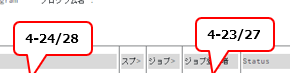
We are using some shape with texts to pin some direction or notice inside an excel document. However, the display method (especially the text truncation) of those texts can be very different from...
- Aug 16, 2023
zhaoli777 Try this:
Once done with all your shapes follow these steps (I assume there are only shapes on the sheet like the ones your screen-shot shows, so no charts or other objects)
- Press F5, click Special, select Objects and click OK (this selects all shapes)
- Right-click any of the shapes, choose "Format shape"
- In the task-pane, click Text Options:
- Click the Textbox icon:
- Click "Resize shape to fit text":

JKPieterse
Aug 16, 2023Silver Contributor
zhaoli777 Try this:
Once done with all your shapes follow these steps (I assume there are only shapes on the sheet like the ones your screen-shot shows, so no charts or other objects)
- Press F5, click Special, select Objects and click OK (this selects all shapes)
- Right-click any of the shapes, choose "Format shape"
- In the task-pane, click Text Options:
- Click the Textbox icon:
- Click "Resize shape to fit text":
 zhaoli777Aug 16, 2023Copper ContributorThanks for the quick reply. It seems to be worked, and I'll test it again with my colleagues tomorrow!