Forum Discussion

yushang
Mar 18, 2023Brass Contributor
about ERROR.TYPE
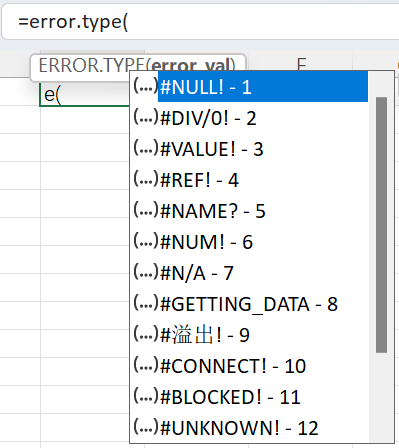
Hi guys, I found ERROR.TYPE has strange behaviors as follow, 1. I can only input part of the values of the help list, they are #NULL! to #GETTING_DATA and #EXTERNAL! 2. the value of ERROR.TY...

JosWoolley
Mar 18, 2023Iron Contributor
Interesting. The official documentation states that "Although error_val can be the actual error value, it will usually be a reference to a cell containing a formula that you want to test".
I tested and I get the same results as you. However, if I instead refer to a cell which contains an error, for example =ERROR.TYPE(A1), then the function works for all error types listed.
 yushangMar 18, 2023Brass Contributor
JosWoolley I found why, #NULL! to #GETTING_DATA and #EXTERNAL can be accepted by Excel literally: if you paste one of them into a cell, for example A1, then the TYPE(A1) will be 16 (error), but the others are not, if you paste one of them into A1, the TYPE(A1) will be 2 (text). This explains the behavior in 1.