Forum Discussion

Luc_de_Jong
May 25, 2020Copper Contributor
A question about dropdown lists
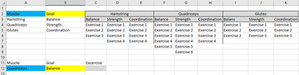
I have a question about dropdown lists. I want to make 3 dropdown lists (the last one dependent). Cell A12 and B12 are both drop down lists (not dependent). In the drop down list I have the opt...

Luc_de_Jong
May 25, 2020Copper Contributor
SergeiBaklan I already tried that. The problem is I can't use the filter command

SergeiBaklan
May 25, 2020Diamond Contributor
If convert above formula to not-DA one, for this
in C12
=IFERROR(
    INDEX(
        INDEX($C$3:$K$9,0,(MATCH($A$12,$A$2:$A$4,0)-1)*3+MATCH($B$12,$B$2:$B$4,0)),
        AGGREGATE(15,6,1/(INDEX(INDEX($C$3:$K$9,0,(MATCH($A$12,$A$2:$A$4,0)-1)*3+MATCH($B$12,$B$2:$B$4,0)),ROW()-ROW($C$11))<>"")*ROW()-ROW($C$11),1)
),"")
and drag it down. See in Sheet2 attached.
- Luc_de_JongMay 25, 2020Copper Contributor
SergeiBaklan Thank you for your respons. It works. I wonder if it is possible to make C12 a drop down list
- SergeiBaklanMay 26, 2020Diamond Contributor
I added maxExercises parameter
formula for the list
is
=OFFSET($C$3,0,(MATCH($A$12,$A$2:$A$4,0)-1)*3+MATCH($B$12,$B$2:$B$4,0)-1,COUNTA(OFFSET($C$3,0,(MATCH($A$12,$A$2:$A$4,0)-1)*3+MATCH($B$12,$B$2:$B$4,0)-1,maxExercises)))in third sheet attached
- Luc_de_JongMay 26, 2020Copper Contributor
SergeiBaklan Dear Sergei,
I'm so so so greatfull for your help. Thank you for putting the time into this and not only explain it, but also creating the formules and the table. I was struggling with it for quite some time now. Once again thanks.
Luc