Forum Discussion

Luc_de_Jong
May 25, 2020Copper Contributor
A question about dropdown lists
I have a question about dropdown lists. I want to make 3 dropdown lists (the last one dependent). Cell A12 and B12 are both drop down lists (not dependent). In the drop down list I have the opt...

SergeiBaklan
May 25, 2020Diamond Contributor
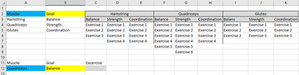
If your version of Excel supports dynamic arrays, for such model
the function could be
=IFNA(FILTER(
    INDEX($C$3:$K$9,0,(MATCH($A$12,$A$2:$A$4,0)-1)*3+MATCH($B$12,$B$2:$B$4,0)),
    INDEX($C$3:$K$9,0,(MATCH($A$12,$A$2:$A$4,0)-1)*3+MATCH($B$12,$B$2:$B$4,0))<>0
),"")
Luc_de_Jong
May 25, 2020Copper Contributor
SergeiBaklan I already tried that. The problem is I can't use the filter command
- SergeiBaklanMay 25, 2020Diamond Contributor
If convert above formula to not-DA one, for this
in C12
=IFERROR(
    INDEX(
        INDEX($C$3:$K$9,0,(MATCH($A$12,$A$2:$A$4,0)-1)*3+MATCH($B$12,$B$2:$B$4,0)),
        AGGREGATE(15,6,1/(INDEX(INDEX($C$3:$K$9,0,(MATCH($A$12,$A$2:$A$4,0)-1)*3+MATCH($B$12,$B$2:$B$4,0)),ROW()-ROW($C$11))<>"")*ROW()-ROW($C$11),1)
),"")
and drag it down. See in Sheet2 attached.
- Luc_de_JongMay 25, 2020Copper Contributor
SergeiBaklan Thank you for your respons. It works. I wonder if it is possible to make C12 a drop down list
- SergeiBaklanMay 26, 2020Diamond Contributor
I added maxExercises parameter
formula for the list
is
=OFFSET($C$3,0,(MATCH($A$12,$A$2:$A$4,0)-1)*3+MATCH($B$12,$B$2:$B$4,0)-1,COUNTA(OFFSET($C$3,0,(MATCH($A$12,$A$2:$A$4,0)-1)*3+MATCH($B$12,$B$2:$B$4,0)-1,maxExercises)))in third sheet attached