Forum Discussion

Vel_Mizar
Jul 02, 2023Copper Contributor
A comment that cannot be edited
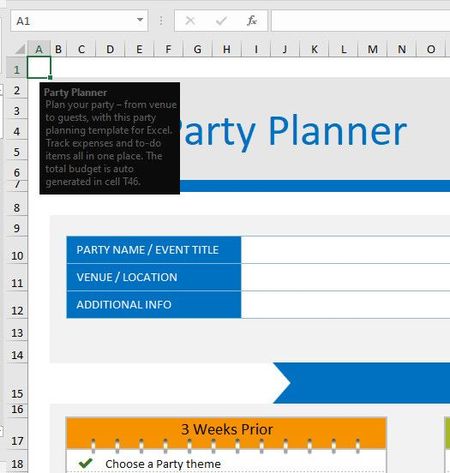
Dear Excel community. Tell me how to edit or create such a non-standard note. Look at the black square. When cell "A1" is activated, a comment box appears. It looks like a note (review note)...
- Jul 02, 2023
Vel_Mizar That's not a regular note or comment. It's part of Data Validation.
Select the cell. Then Data Validation on the Data ribbon.
Edit or clear the input message or just press Clear All if you want to get rid of it. That's it.

Riny_van_Eekelen
Jul 02, 2023Platinum Contributor
Vel_Mizar That's not a regular note or comment. It's part of Data Validation.
Select the cell. Then Data Validation on the Data ribbon.
Edit or clear the input message or just press Clear All if you want to get rid of it. That's it.

Vel_Mizar
Jul 02, 2023Copper Contributor
Yes - it is. Thank you. This is a hint about the contents of the cell.