Forum Discussion

2016 Series autofill not properly working
 Jun 19, 2022
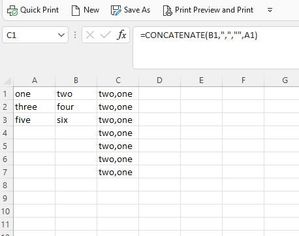
It seems like you have Manual calculation mode set. Change to Automatic calculation mode.
In my version of Excel, I click Formulas > Calculation Options > Automatic. It might be different in your version.
------
Aside....
It appears that your formula is =CONCATENATE(A1, ",", "", B1). If I am right and the third parameter is the null string, there is no need to concatenate the null string.
Moreover, there is no need to use the CONCATENATE function in this case. Simply write:
=A1 & "," & B1
Finally, I have a hard time reading your tiny images, even when I open them in a new window and zoom in. In the future, either post large images or, better, attach the example Excel file. If the forum does not allow you to click "browse" at the bottom of the reply window, upload the Excel file to a file-sharing website, and post the download URL. I like box.net/files; others like dropbox.com. You might like onedrive.live.com because it shares the login with this forum.
It seems like you have Manual calculation mode set. Change to Automatic calculation mode.
In my version of Excel, I click Formulas > Calculation Options > Automatic. It might be different in your version.
------
Aside....
It appears that your formula is =CONCATENATE(A1, ",", "", B1). If I am right and the third parameter is the null string, there is no need to concatenate the null string.
Moreover, there is no need to use the CONCATENATE function in this case. Simply write:
=A1 & "," & B1
Finally, I have a hard time reading your tiny images, even when I open them in a new window and zoom in. In the future, either post large images or, better, attach the example Excel file. If the forum does not allow you to click "browse" at the bottom of the reply window, upload the Excel file to a file-sharing website, and post the download URL. I like box.net/files; others like dropbox.com. You might like onedrive.live.com because it shares the login with this forum.
 HR2020Jun 22, 2022Copper ContributorThank you!
Your suggestion hit the right answer. For some reason the automatic was unchecked.
Thank you, again.