Forum Discussion

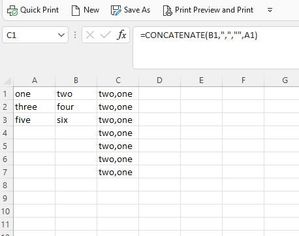
2016 Series autofill not properly working
 Jun 19, 2022
It seems like you have Manual calculation mode set. Change to Automatic calculation mode.
In my version of Excel, I click Formulas > Calculation Options > Automatic. It might be different in your version.
------
Aside....
It appears that your formula is =CONCATENATE(A1, ",", "", B1). If I am right and the third parameter is the null string, there is no need to concatenate the null string.
Moreover, there is no need to use the CONCATENATE function in this case. Simply write:
=A1 & "," & B1
Finally, I have a hard time reading your tiny images, even when I open them in a new window and zoom in. In the future, either post large images or, better, attach the example Excel file. If the forum does not allow you to click "browse" at the bottom of the reply window, upload the Excel file to a file-sharing website, and post the download URL. I like box.net/files; others like dropbox.com. You might like onedrive.live.com because it shares the login with this forum.

Important: In Excel 2016, Excel Mobile, and Excel for the web, this function has been replaced with the CONCAT function. Although the CONCATENATE function is still available for backward compatibility, you should consider using CONCAT from now on. This is because CONCATENATE may not be available in future versions of Excel.