Forum Discussion

2 way lookup
- Jan 12, 2020
Thank you for the update. With that perhaps like
=IFERROR(INDEX($B$2:$B$8,AGGREGATE(15,6,1/($C$2:$C$8<=INDEX($G$2:$G$12,MATCH($B$2:$B$8,$F$2:$F$12,0)))*(ROW($B$2:$B$8)-ROW($B$1)),ROW()-ROW($K$1))),"")Please check in attached.


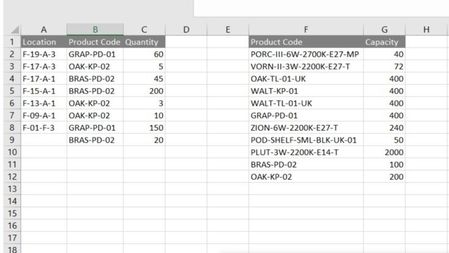
In column B there are few entries for each product code. If found, sum quantity for all locations to compare with capacity?
No, I need to compare each one and display the results.
"..to display location, product code and quantity" - product code is already displayed in column F. Where to display location and quantity?
Although product code is displayed in column F that column is fixed and i need to re-display product code from column B along with location and quantity in another table.
I have attached my worksheet.

As an alternative:
If you can accept a solution that simply filters the items that match your criteria, you could do the following. Introduce a helper column D to check the criteria en enter
=INDEX(G:G,MATCH(B2,F:F,0))>C2
in D2. Copy the formula down to the bottom of your list and filter it on TRUE.
In your example, filtering on the first table will also hide row 5 from the second table because you have them side-by-side. Probably an unwanted situation. So if it works for you not having both tables in the same sheet and side-by-side (thus move the second table somewhere else), this is an easy solution. Obviously, you need to update the column references for G and F to their new location.
- mark76Jan 13, 2020Copper Contributor