Forum Discussion

2 way lookup
- Jan 12, 2020
Thank you for the update. With that perhaps like
=IFERROR(INDEX($B$2:$B$8,AGGREGATE(15,6,1/($C$2:$C$8<=INDEX($G$2:$G$12,MATCH($B$2:$B$8,$F$2:$F$12,0)))*(ROW($B$2:$B$8)-ROW($B$1)),ROW()-ROW($K$1))),"")Please check in attached.

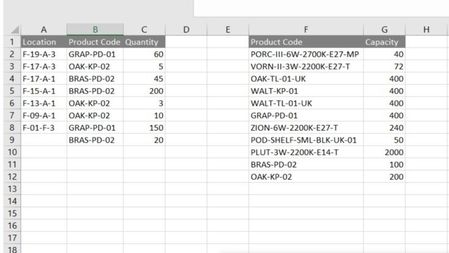
In column B there are few entries for each product code. If found, sum quantity for all locations to compare with capacity?
"..to display location, product code and quantity" - product code is already displayed in column F. Where to display location and quantity?
Better to attach the sample with manually generated result, it'll be much easier to understand what is required.

In column B there are few entries for each product code. If found, sum quantity for all locations to compare with capacity?
No, I need to compare each one and display the results.
"..to display location, product code and quantity" - product code is already displayed in column F. Where to display location and quantity?
Although product code is displayed in column F that column is fixed and i need to re-display product code from column B along with location and quantity in another table.
I have attached my worksheet.
- Riny_van_EekelenJan 12, 2020Platinum Contributor
As an alternative:
If you can accept a solution that simply filters the items that match your criteria, you could do the following. Introduce a helper column D to check the criteria en enter
=INDEX(G:G,MATCH(B2,F:F,0))>C2in D2. Copy the formula down to the bottom of your list and filter it on TRUE.
In your example, filtering on the first table will also hide row 5 from the second table because you have them side-by-side. Probably an unwanted situation. So if it works for you not having both tables in the same sheet and side-by-side (thus move the second table somewhere else), this is an easy solution. Obviously, you need to update the column references for G and F to their new location.
- mark76Jan 13, 2020Copper Contributor
- SergeiBaklanJan 12, 2020Diamond Contributor
Thank you for the update. With that perhaps like
=IFERROR(INDEX($B$2:$B$8,AGGREGATE(15,6,1/($C$2:$C$8<=INDEX($G$2:$G$12,MATCH($B$2:$B$8,$F$2:$F$12,0)))*(ROW($B$2:$B$8)-ROW($B$1)),ROW()-ROW($K$1))),"")Please check in attached.
